

Key Takeaways:
- AI integration helps mobile apps deliver personalized experiences, automate repetitive tasks, improve customer support, and strengthen security.
- Businesses can start with pre-built AI APIs like OpenAI, Google AI, or AWS AI, making AI adoption faster and more cost-effective than building custom models.
- Successful AI integration follows a structured process: define the use case, prepare quality data, choose the right tools, integrate, test, and continuously monitor performance.
- Existing mobile apps can add AI features without a complete rebuild by using APIs and a microservices architecture.
- Mobile developers should focus on Kotlin for Android, Swift for iOS, or Dart for cross-platform app development with Flutter.
- AI implementation comes with challenges such as data quality, security, model bias, and API costs, but these can be managed with the right strategy and best practices.
- Choosing an experienced AI development partner ensures smooth implementation, ongoing model maintenance, and long-term scalability.
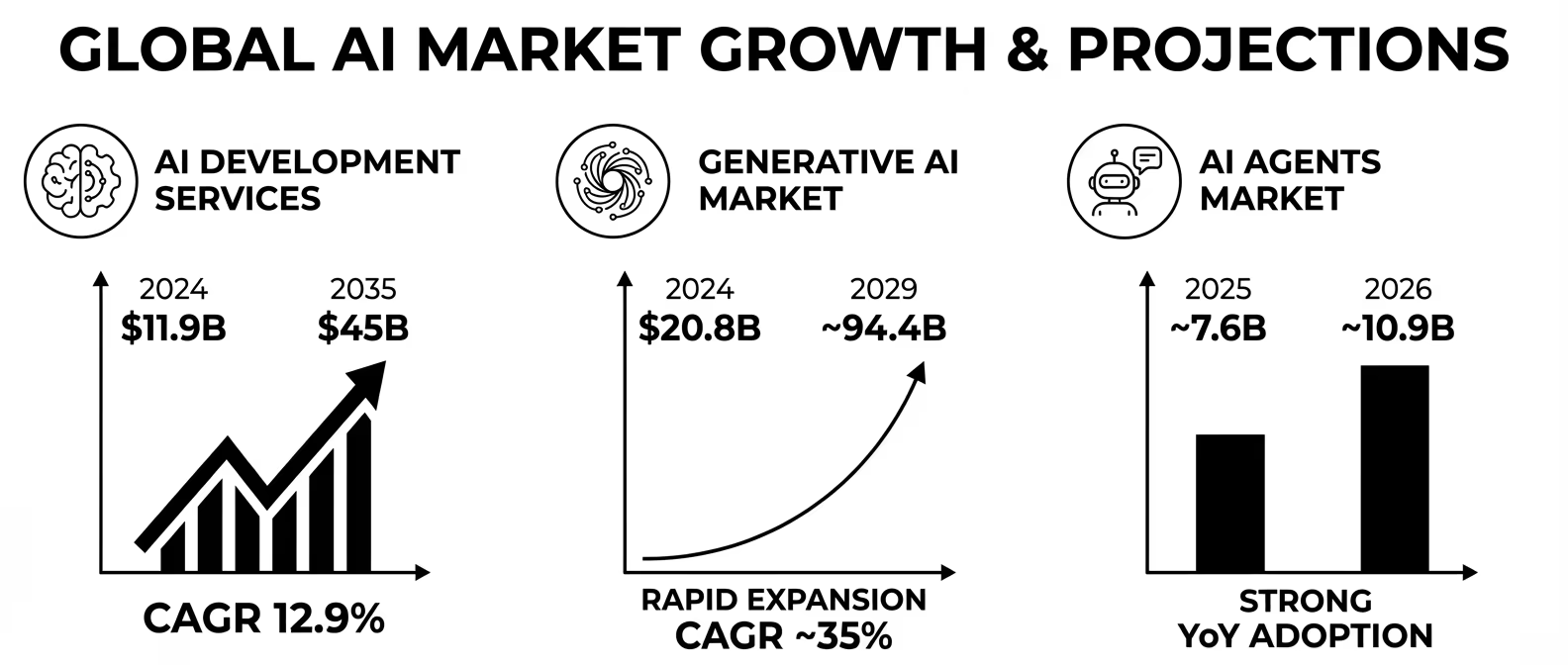
- As the global AI market continues to grow rapidly, integrating AI into mobile apps is becoming a key competitive advantage for businesses across industries.
Your phone can now talk to you, understand what you say, and give smart answers. This is AI working inside a mobile app. More and more businesses are adding AI to their apps to serve customers better, save time, and stay ahead of the competition.
But how exactly do you integrate AI into a mobile app? What steps do you follow? What tools do you need? And how much does it cost?
This complete guide answers all these questions. It is written in simple words so anyone, even a student, can understand. By the end, you will know exactly how to start integrating AI into your mobile application.
What Does It Mean to Integrate AI into an App?
Adding AI to an app means giving your app the power to think, learn, and make smart decisions. Instead of following fixed rules, an AI-powered app understands patterns and improves over time.
For example:
- A shopping app that shows products you are likely to buy, which is AI at work.
- A chat support bot that answers customer questions automatically, which is AI.
- A fitness app that creates workout plans based on your health data, which is AI.
When you integrate AI into an existing application, you do not always need to build everything from scratch. You can connect ready-made AI tools using APIs (Application Programming Interfaces). These APIs do the heavy AI work so your app can focus on the user experience.
Why Should You Add AI to Your Mobile App?
Here are the biggest reasons businesses are adding AI to apps right now:
| Benefit | What It Does for Your App |
| Smarter User Experience | The app understands what each user wants and shows relevant content. |
| 24/7 Customer Support | AI chatbots answer questions any time, without human help. |
| Automation | AI handles boring, repetitive tasks, saving your team hours of work. |
| Better Recommendations | AI suggests products, content, or services users actually want. |
| Fraud Detection | AI spots unusual patterns and flags suspicious activity fast. |
| Voice & Image Search | Users can search by speaking or taking a photo, no typing needed. |
| Predictive Analytics | AI predicts future trends so you can plan better. |
| Higher Retention | Personalized apps keep users coming back longer. |
According to recent industry reports, apps with AI-powered personalization see up to 30% higher user engagement compared to apps without AI features.
AI Market Growth Is Driving Mobile App Innovation
The rapid growth of the artificial intelligence market is encouraging businesses to invest in AI-powered mobile applications.
According to Grand View Research, the global AI market was valued at USD 390.9 billion in 2025 and is expected to grow to USD 539.5 billion in 2026, reaching USD 3,497.3 billion by 2033 at a CAGR of 30.6%.
This remarkable growth is fueled by the increasing adoption of generative AI, agentic AI, machine learning, and intelligent automation across industries.
As AI technologies become more accessible through cloud platforms, APIs, and pre-trained models, integrating AI into mobile apps is becoming a strategic investment for businesses looking to improve customer experiences, automate operations, and stay competitive.
Types of AI Features You Can Add to a Mobile App
Before you start integrating AI into your mobile application, you need to decide what kind of AI features you want. Below are the most popular ones:
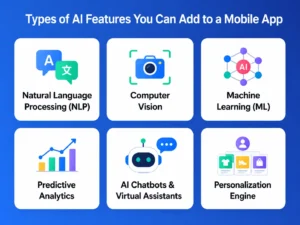
1. Natural Language Processing (NLP)
NLP lets your app understand and respond to human language. You can use it to build chatbots, voice assistants, and text analyzers. Apps like Google Maps, Siri, and customer service bots all use NLP.
2. Computer Vision
This lets your app understand images and videos. You can use it for face recognition, object detection, and QR code scanning. Apps like Instagram filters and medical imaging tools use computer vision.
3. Machine Learning (ML)
ML allows your app to learn from data and improve without being reprogrammed. E-commerce apps use ML to show product recommendations. Streaming apps like Netflix use ML to suggest what to watch next.
4. Predictive Analytics
This uses past data to predict what will happen next. A ride-sharing app might predict traffic and suggest the fastest route. A sales app might predict which customers are most likely to buy.
5. AI Chatbots & Virtual Assistants
These are AI-powered agents that talk to users. They can answer FAQs, book appointments, collect feedback, and more. They work 24/7 and reduce the load on your customer support team.
6. Personalization Engine
This AI feature shows every user a different version of the app based on their behavior and preferences. News apps, music apps, and shopping apps all use personalization engines.
How to Integrate AI into a Mobile App – Step-by-Step Process
Now, let’s look at the exact steps you should follow to integrate AI into a mobile app. By following this process, you can make sure you don’t miss any important step.
Step 1: Define Your AI Use Case
The first step is to identify the problem you want AI to solve in your app. Be specific. Instead of saying, “I want AI in my app,” define the exact feature you need.
For example:
- I want an AI chatbot to handle customer support.
- I want AI to recommend products based on user history.
- I want AI to detect fraud in real-time payments.
Having a clear use case makes it easier to choose the right AI tools and prevents unnecessary development costs.
Write down the problem, the expected AI solution, and the success metric (e.g., reduce support tickets by 40%) before you write a single line of code.
Step 2: Choose the Right AI Approach
There are three common ways to integrate AI into an existing application.
| Approach | Best For | Example Tools |
| Pre-built AI APIs | Startups and SMBs that want faster development | OpenAI, Google AI, AWS AI, Azure AI |
| Custom AI Models | Large enterprises with unique business needs | TensorFlow, PyTorch, scikit-learn |
| AutoML Platforms | Teams with limited machine learning expertise | Google AutoML, Amazon SageMaker |
For most businesses, pre-built AI APIs are the quickest and most affordable option. As your app grows, you can always move to custom AI models later.
Step 3: Collect and Prepare Your Data
AI learns from data, so the quality of your data directly affects how well your AI performs.
Here are the main steps:
- Collect relevant data from your app, users, and business systems.
- Clean the data by removing duplicates, fixing errors, and filling missing values.
- Label the data if you’re building a supervised learning model.
- Split the data into training and testing datasets.
Remember:
Bad data = Bad AI.
Always use clean, organized, and high-quality data.
Step 4: Select Your AI Tools and Frameworks
Here are some of the most popular AI tools used in mobile app development.
| Tool / Platform | What It Does | Best For |
| OpenAI API (ChatGPT) | Language generation, chatbots, summarization | Conversational AI, content apps |
| Google Cloud AI | Vision AI, Speech AI, Translation AI | Image and voice features |
| AWS AI Services | Rekognition, Comprehend, Forecast | Enterprise-grade AI integration |
| Azure AI | Cognitive Services, AI Search, Bot Service | Microsoft-based applications |
| TensorFlow Lite | Runs ML models directly on mobile devices | On-device AI, offline apps |
| Core ML (Apple) | Runs ML models on iOS devices | AI features for iOS apps |
| ML Kit (Google) | Ready-to-use machine learning features | Text recognition, face detection |
| Hugging Face | Open-source NLP and LLM models | Custom language AI models |
Step 5: Build or Connect the AI Model
At this stage, you build the AI feature. There are two ways to do it.
Path A – Using a Pre-built API
- Sign up for the AI API (for example, OpenAI API).
- Get your API key.
- Connect your app to the API by writing the required code.
- Receive the AI response and display it in your app.
Path B – Building a Custom Model
- Collect and prepare your training data.
- Choose a framework like TensorFlow or PyTorch.
- Train the AI model using your data.
- Test the model to check its accuracy.
- Export the model for mobile deployment, such as TensorFlow Lite.
Step 6: Integrate AI Into Your Mobile App
Now it’s time to connect the AI model with your mobile app.
Follow these steps:
- Use REST APIs or SDKs to connect the AI model.
- Create a backend using Node.js, Python Flask, or FastAPI to process AI requests.
- Send user input from the app to the AI backend.
- Receive the AI response and display it in the app’s interface.
- Optimize the integration so users get responses within 1–2 seconds.
Always store your AI API keys in secure server-side environment variables. Never put API keys directly in your mobile app’s code, hackers can find and misuse them.
Step 7: Test Your AI Features Thoroughly
Testing AI is different from testing regular app features.
Make sure you check:
- Accuracy – Does the AI provide correct responses?
- Speed – Does it respond quickly?
- Edge Cases – Can it handle unusual or unexpected user inputs?
- Bias – Does it provide fair results for all users?
- Load Testing – Does it perform well when many users access it at the same time?
Before launching your app, run beta tests with real users, collect their feedback, and improve the AI based on their experience.
Step 8: Deploy and Monitor Your AI Integration
Once testing is complete, deploy your AI-powered mobile app.
However, AI requires continuous monitoring even after launch.
Keep track of the following:
- Monitor performance to identify any drop in AI accuracy.
- Retrain your AI model regularly using new data.
- Track API usage and control AI-related costs.
- Collect user feedback to improve AI responses.
- Update your AI model whenever your AI provider releases new improvements.
Regular monitoring helps your AI stay accurate, efficient, and useful as user behavior changes over time.
How to Integrate AI into an Existing Application
Many businesses already have a mobile app and simply want to add AI capabilities without rebuilding the entire application. The best approach is to integrate AI gradually while keeping your existing system stable.
Follow these steps:
- Audit your existing app architecture – Review your application’s current structure and identify the best places to integrate AI features.
- Start with one AI use case – Choose a single, high-impact AI feature such as an AI chatbot, personalized recommendations, or fraud detection, instead of trying to implement multiple features at once.
- Use a microservices architecture. Deploy the AI functionality as a separate service that communicates with your app through APIs. This keeps your core application independent and makes future updates easier.
- Roll out AI gradually. Use feature flags to release the AI feature to a small group of users first. This allows you to test performance, gather feedback, and fix issues before a wider launch.
- Expand after successful testing. Once the AI feature is stable and performing well, roll it out to your entire user base and continue monitoring its performance for ongoing improvements.
The best way to integrate AI into an existing application is to treat AI as a separate microservice. This way, if the AI service has a problem, your main app keeps working normally.
How Much Does It Cost to Add AI to a Mobile App?
The cost of AI integration depends on what you build and how you build it. Here is a rough breakdown:
| AI Integration Type | Estimated Cost Range | Time to Build |
| Pre-built API Integration (e.g., chatbot) | $5,000 – $25,000 | 2 – 6 weeks |
| Custom ML Model (moderate complexity) | $25,000 – $80,000 | 2 – 4 months |
| Full AI-Powered App from Scratch | $80,000 – $300,000+ | 6 – 12 months |
| Ongoing AI API Costs (usage-based) | $50 – $5,000/month | Ongoing |
| AI Maintenance and Model Retraining | $500 – $5,000/month | Ongoing |
Working with an experienced AI App Development Company can help you get better results faster, while staying within your budget.
Common Challenges When Integrating AI into Mobile Apps
AI integration is exciting, but it also comes with challenges. Here are the most common ones and how to handle them:
| Challenge | Solution |
| Poor Data Quality | Clean and validate data before training. Use data pipelines to automate this. |
| Slow AI Response Time | Use caching, CDN for AI responses, and optimize API calls. |
| High API Costs | Set usage limits, cache common responses, and batch API requests. |
| Privacy and Data Security | Anonymize user data, follow GDPR/CCPA rules, and use end-to-end encryption. |
| AI Model Bias | Use diverse, representative training data and run fairness audits. |
| Integration Complexity | Use a microservices architecture and REST APIs to keep AI loosely coupled from your main app. |
| Keeping AI Updated | Schedule regular model retraining and monitor performance dashboards. |
Real-World Examples of AI in Mobile Apps
Many of the world’s leading mobile apps use AI to improve user experiences, automate tasks, and deliver personalized services. Here are some real-world examples of how AI is transforming mobile applications.
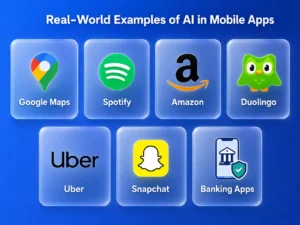
1. Google Maps
Google Maps uses AI to analyze real-time traffic data, road conditions, and historical travel patterns to suggest the fastest routes. It also predicts estimated arrival times (ETAs) more accurately and recommends alternate routes when traffic congestion or road closures occur. This helps users save time and enjoy a smoother travel experience.
2. Spotify
Spotify uses machine learning (ML) to understand users’ listening habits, favorite genres, and skipped songs. Based on this data, it creates personalized playlists such as Discover Weekly and Daily Mix while recommending new music and podcasts that match individual preferences. This keeps users engaged with content they are more likely to enjoy.
3. Amazon
Amazon leverages AI to recommend products based on a customer’s browsing history, previous purchases, and shopping behavior. It also uses AI-powered visual search, allowing users to search for products using images instead of text. Behind the scenes, AI helps forecast product demand and optimize inventory management for faster deliveries.
4. Duolingo
Duolingo uses AI to personalize language lessons according to each learner’s progress, strengths, and weak areas. The app adjusts the difficulty level of exercises based on user performance, making learning more effective and engaging. AI also helps provide instant feedback to improve the overall learning experience.
5. Uber
Uber relies on AI to match riders with nearby drivers quickly and efficiently. It analyzes traffic conditions, ride demand, and driver availability to optimize routes and reduce waiting times. AI also powers dynamic pricing, adjusting fares during peak hours based on real-time demand and supply.
6. Snapchat
Snapchat uses computer vision and AI to recognize facial features and apply augmented reality (AR) filters in real time. AI enables interactive lenses, face tracking, and object recognition, creating engaging and personalized camera experiences. These intelligent features have become one of Snapchat’s biggest attractions.
7. Banking Apps
Modern banking apps use AI to detect suspicious transactions and prevent fraud by analyzing customer spending patterns in real time. AI-powered chatbots provide instant customer support, while intelligent financial assistants offer personalized budgeting tips, spending insights, and savings recommendations. This helps improve both security and customer experience.
How to Choose the Right AI Development Partner
Building AI features requires specialized knowledge and technical expertise. If your in-house team lacks experience with AI, partnering with the right AI development services provider can help you build reliable and scalable AI solutions. Here are the key factors to consider:
- Proven AI expertise: Choose a company with a strong track record in delivering AI and machine learning projects across different business use cases.
- AI-powered app portfolio: Review their previous work to see if they have successfully built and deployed AI-powered mobile applications.
- Skilled technical team: Make sure they have experienced AI engineers, data scientists, and mobile app developers who can handle the entire development process.
- Industry experience: A partner with experience in your industry, such as healthcare, fintech, retail, or logistics, can better understand your business needs and compliance requirements.
- Transparent pricing: Look for clear pricing, realistic timelines, and well-defined project milestones to avoid unexpected costs and delays.
- Post-launch support: AI models require regular monitoring and updates. Choose a provider that offers ongoing maintenance, performance optimization, and technical support.
A trusted mobile application development company with AI expertise can help you plan, build, deploy, and maintain AI features while reducing development risks and ensuring long-term success.
Best Practices for Adding AI into Your App
Follow these best practices to ensure your AI integration delivers the best results:
- Start with one AI feature: Begin with a single AI use case instead of adding multiple features at once. You can expand as your app grows.
- Focus on the user experience: AI should make your app more useful, faster, and easier to use.
- Be transparent: Let users know when they are interacting with AI. This builds trust and sets clear expectations.
- Collect user feedback: Encourage users to share ratings and feedback so you can improve your AI features over time.
- Monitor AI performance: Regularly track accuracy, response time, and overall performance. Set up alerts to identify and fix issues quickly.
- Protect user data: Handle it securely and never use it for AI training without proper consent.
- Have a backup plan: AI can make mistakes. Build fallback options so users can still complete tasks if the AI doesn’t provide the right response.
- Document your AI system: Keep records of the data you use, how the AI model is trained, and the version currently running. This makes future updates and maintenance much easier.
Conclusion
Integrating AI into a mobile app is no longer limited to large enterprises. With the availability of pre-built AI APIs, machine learning frameworks, and cloud-based AI services, businesses of all sizes can add intelligent features that improve user experience, automate processes, and drive better business outcomes.
To summarize, the process of integrating AI into a mobile app involves:
- Defining the problem AI will solve.
- Choosing between pre-built APIs and custom AI models.
- Collecting and preparing quality data.
- Selecting the right AI tools and frameworks.
- Building or connecting the AI model.
- Integrating AI into your app through APIs or SDKs.
- Testing for accuracy, performance, and reliability.
- Continuously monitoring and improving your AI solution after deployment.
If you’re looking for reliable AI integration services, Developer Bazaar Technologies can help. Our team specializes in integrating AI into mobile applications, delivering scalable, secure, and high-performance AI solutions tailored to your business needs.
FAQs
Q1: How do I integrate AI into a mobile app if I have no AI experience?
The easiest way is to use pre-built AI APIs like OpenAI, Google AI, or AWS AI. These services do the hard AI work for you. You just connect them to your app using simple API calls. If you need help, hire an AI App Development Company with experience in mobile AI integration.
Q2: Can I integrate AI into an existing app without rebuilding it?
Yes! You can add AI features to your existing app without starting from scratch. The best approach is to build AI as a separate microservice and connect it to your app using REST APIs. This way, your existing app stays stable while you add new AI capabilities.
Q3: What is the cheapest way to add AI into an app?
The cheapest way is to use pay-as-you-go AI APIs. You pay only for what you use. Start with OpenAI’s API or Google Cloud AI, both offer free tiers to get started. This approach costs much less than building a custom AI model from scratch.
Q4: How long does it take to integrate AI into a mobile app?
It depends on the complexity. A simple chatbot integration can take 2 – 4 weeks. A custom AI model integration can take 3 – 6 months. A full AI-powered app built from scratch can take 6 – 12 months. Working with an experienced AI developers team speeds up the process significantly.
Q5: Is it safe to use AI in mobile apps?
Yes, if you follow proper security practices. Always store API keys server-side, anonymize user data before using it in AI, follow privacy laws like GDPR and CCPA, and test your AI for bias and security vulnerabilities before launch.
Q6: What are the best AI tools for mobile app development?
The best tools depend on your use case. For conversational AI, use OpenAI API. For vision features, use Google Cloud Vision or AWS Rekognition. For on-device AI, use TensorFlow Lite (Android) or Core ML (iOS). For NLP, use Hugging Face models or Google Natural Language API.
Q7: Do I need a large dataset to use AI in my app?
Not always. If you use pre-built AI APIs like ChatGPT or Google AI, you do not need your own dataset, the model is already trained. You only need your own dataset if you are building a custom AI model specifically for your business use case.