



How much does it cost to develop an education app in 2026? Ever asked this question? Many schools, startups, and companies want to build an education app to teach students online. But before they start, they want to know the budget, features, and process. The cost to develop an education app depends on design, features, platform (iOS, Android, or cross-platform), and development time.
In this blog, you will learn the education app development cost, key features, market trends, and benefits. This guide is written in simple language so anyone can understand it.
What is an Educational App?
An educational app is software that helps people learn from their phone, tablet, or computer. It supports online learning and self-learning. Some apps teach kids basic math and reading. Others teach coding, language, or job skills for adults.
Many apps include learning management systems (LMS), video lessons, quizzes, and progress tracking. The main goal of an education app platform is to give a complete learning solution in one place.
When businesses develop an education app, they often add features like live classes, AI recommendation systems, and student dashboards.
Who Uses Educational Apps?
Educational apps are used by many people and organizations:
- Parents who want fun learning apps for kids
- School and college students preparing for exams
- Professionals learning new skills or certifications
- People who want to learn new hobbies
- Teachers tracking student progress
- Schools and universities are solving learning problems
- Online course platforms promoting courses
Today, many companies build an education app for training employees and customers, too.
Education App Market Trends & Statistics You Should Know
The education app market is growing very fast across the world because more people now prefer learning from their phones and laptops. Schools, companies, and students are using digital learning every day.
Market size and growth
- In 2025, the global education app market reached USD 7.6 billion.
- By 2034, it is expected to grow to USD 43 billion.
- This means the market will grow at a 21.29% CAGR from 2026 to 2034.
This strong growth is happening because online learning is now common. Students want flexible learning options. Companies also use apps to train employees. New technologies like AI and mobile learning are making education apps smarter and more useful.
Why is Demand Increasing?
More people are learning online instead of only in classrooms. Mobile phones allow students to learn anytime and anywhere. Also, AI in education apps helps give personalized lessons, which makes learning easier and faster. Remote learning and digital classrooms have also increased after the pandemic.
Key Trends in Education App Development
AI recommendation for personalized learning: AI studies how a student learns and suggests lessons based on their level. This makes learning more effective because each student gets a custom learning path.
Video-based lessons and microlearning: Short videos and small lessons help students understand topics quickly. Many users prefer 5–10 minute lessons instead of long lectures.
AR/VR learning experiences: Augmented reality and virtual reality make learning interactive. For example, students can explore space or the human body in 3D. This improves understanding and engagement.
Gamification and quizzes: Games, points, and rewards keep students interested. Quizzes help test knowledge and make learning fun.
Corporate training apps: Many companies now build an education app for employee training. These apps help staff learn new skills and complete courses easily.
Cross platform app development: Businesses prefer apps that work on both iOS and Android. Cross-platform development saves time and cost while reaching more users.
LMS development integration: Many apps now include learning management systems. LMS helps teachers upload courses, track student progress, and manage classes in one place.
Regional growth
The Asia Pacific region, especially India and China, is growing fast in education app use. This is because of large student populations, affordable smartphones, and better internet access.
App store popularity
Education apps are among the top categories in app stores. This shows strong user demand. More startups and companies now want to develop an education app to enter this growing market.
The Benefits of Educational Apps
People want learning that is easy, flexible, and available anytime. Educational apps make this possible. They help students, teachers, and professionals learn from anywhere using their phones. Let us understand the main benefits of educational apps:
1. Mobile and portability
Educational apps work on mobile phones and tablets. This means students can learn anytime and anywhere, at home, in a bus, or while traveling. They do not need to carry heavy books or go to a classroom every day. With just one tap, lessons and videos are ready to use. This makes learning very easy for busy students and working professionals.
2. Increased engagement
Apps use videos, animations, images, and quizzes. These make lessons fun and interesting. In a classroom, students may feel bored during long lectures. But in an app, they can watch short videos, play learning games, and answer quizzes. This keeps them active and helps them understand topics better.
3. Time efficiency
Educational apps save time in many ways. Students do not need to travel to coaching centers. They can open the app and start learning instantly. Notes, recordings, and assignments are all in one place. Notifications remind them about classes and homework. This helps students manage time better and stay organized.
4. Money saving
Many learning apps are affordable. Even paid apps usually cost less than hiring private tutors or joining offline classes. Some apps also offer free courses and trial lessons. Because of this, students can learn new skills without spending too much money. It becomes a cost-friendly way to study.
5. Wide variety of courses
Educational apps offer many types of courses. Students can learn school subjects, coding, languages, design, business skills, and more. They are not limited to courses available in their city. They can choose any course from anywhere in the world. This gives them more learning choices and career opportunities.
6. Constant availability
Educational apps are available 24/7. Unlike schools or colleges, they do not close. Students can study early in the morning or late at night. If they have doubts, they can rewatch lessons or check notes anytime. This freedom helps students learn at their own speed.

Education App Development Process: From Idea to Launch
To develop an education app, you need a good understanding of both learning needs and mobile app technology. A clear and step-by-step plan helps you save time, money, and effort. Below is the simple process that most companies follow to build an education app successfully.
1. Research and Ideation
The first step is research and idea planning. Before you create an educational app, you must understand who will use it. Your target users may be school students, college learners, teachers, or working professionals. After deciding on the audience, you should collect the course content and study what other learning apps are offering. This helps you find gaps in the market and build something unique.
You also need to choose a business model, such as subscription, free courses, or paid certifications. Planning the features and setting a budget at this stage helps avoid confusion later and ensures that your app idea is clear and practical.
2. App Design (UI/UX)
Once the idea is ready, the next step is designing the app. A simple and user-friendly design is very important because students should easily find lessons and courses. The app should have clear navigation so users can move from one section to another without confusion. Buttons should be medium-sized and easy to tap.
Colors and layouts should be simple so that the interface looks clean and not crowded. A well-designed dashboard helps students track their progress and access lessons quickly. Good design improves user experience and keeps learners interested in using the app daily.
3. App Development
After the design is approved, developers begin building the app. This stage includes front-end development, which is what users see and interact with, and back-end development, which manages the server, database, and app logic. Developers also add API integrations so the app can connect with other services.
Many apps include LMS development so teachers can upload courses and track progress. Advanced apps also include AI in education app features, such as AI recommendation systems that suggest lessons based on student performance. During development, testing is done regularly to fix bugs and allow smooth performance.
4. Testing and Deployment
When development is complete, the app is tested on different devices to make sure everything works properly. After testing, the app is launched on platforms like iOS, Android, or web browsers. Even after launch, the work does not stop. Developers continue to update the app, fix issues, and add new features. Partnering with a skilled education app development company helps you launch faster and better quality and long-term support.
Must-Have Features in a Modern Education App
The features of education app play a big role in how useful and successful it becomes. A good app should support students, teachers, and administrators with the right tools. Below are the most important features explained in simple words.
Student Features
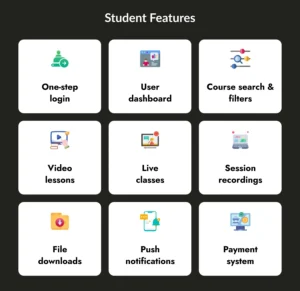
One-step login
A one-step login allows students to quickly enter the app using email, phone number, or social login. This saves time and makes the app easy to use daily. A smooth login experience keeps users from leaving the app.
User dashboard
The dashboard shows course progress, upcoming lessons, and completed tasks. Students can track their learning journey in one place. It helps them stay organized and motivated.
Course search & filters
When many courses are available, students need a search bar and filters. They can search by subject, level, language, or price. This makes it easier to find the right course quickly.
Video lessons
Video lessons are the core of most learning apps. They help students understand topics visually and clearly. Students can pause, replay, and learn at their own speed.
Live classes
Live classes allow real-time interaction between students and teachers. Students can ask questions and get instant answers. This makes learning more engaging and classroom-like.
Session recordings
Recorded sessions help students rewatch lessons anytime. This is useful when they miss a class or want to revise topics. It also helps during exam preparation.
File downloads
Students should be able to download notes, PDFs, and study materials. This allows them to study offline whenever they want. It also helps them revise without internet access.
Push notifications
Push notifications inform students about new lessons, assignments, and test results. These reminders help them stay active and not miss important updates. It increases app usage.
Payment system
A secure payment system allows students to buy courses and subscriptions easily. Options like UPI, cards, and wallets make payments simple. This feature is important for monetization.
Teacher Features
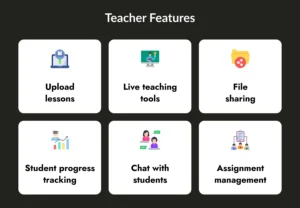
Upload lessons
Teachers should be able to upload videos, documents, and assignments easily. This helps them share course content quickly. It keeps the learning process smooth.
Live teaching tools
Live teaching tools allow teachers to conduct online classes. They can use whiteboards, screen sharing, and chat features. This makes online teaching interactive.
File sharing
Teachers can share files like notes, images, and PDFs during or after classes. This helps students understand lessons better. It also improves communication.
Student progress tracking
Teachers need tools to track student performance and attendance. They can check quiz scores and course completion. This helps them guide students better.
Chat with students
Chat features allow teachers to answer questions and give feedback. Students can clear doubts anytime. This improves learning support.
Assignment management
Teachers can create assignments, collect submissions, and give grades. This keeps learning structured and organized. It also helps monitor student improvement.
Admin Features
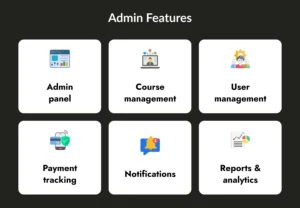
Admin panel
The admin panel is used to manage the whole app. Admins can control users, courses, and content. It helps keep everything organized.
Course management
Admins can add, update, or remove courses from the platform. This makes content updated and relevant. It also helps manage course quality.
User management
Admins can manage student and teacher accounts. They can block, edit, or approve users if needed. This keeps the platform secure.
Payment tracking
Payment tracking helps admins monitor subscriptions and transactions. They can see revenue and payment history. This helps manage finances.
Notifications
Admins can send announcements and updates to users. They can inform about new courses or offers. This improves user engagement.
Reports & analytics
Reports show user activity, course performance, and revenue data. Admins can use this data to improve the app. It helps in decision-making.
Advanced Features
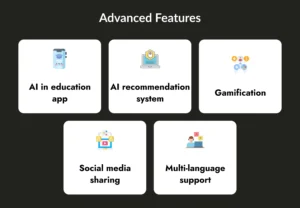
AI in education app
AI helps personalize learning for each student. It studies user behavior and suggests lessons. This makes learning more effective.
AI recommendation system
AI recommendation suggests courses based on interests and progress. Students get the right content at the right time. This improves engagement.
Gamification
Gamification adds points, badges, and rewards. This makes learning fun and motivating. Students stay active on the app.
Social media sharing
Students can share achievements and certificates on social media. This promotes the app and motivates others. It also builds community.
Multi-language support
Multi-language support helps users learn in their preferred language. This makes the app useful for global audiences. It increases user reach.
Adding more advanced features increases the education app development cost. So businesses should choose features carefully when they build an education app to match their budget and goals.
Cost to Develop an Education App: Complete Cost Breakdown
The cost to develop an education app depends on features, platform, and complexity. Below is an estimated breakdown.
| App Type | Estimated Cost |
| Basic MVP app | $15,000 – $50,000 |
| Mid-level app | $50,000 – $100,000 |
| Advanced app with AI & LMS | $100,000 – $200,000+ |

The Tech Stack Required For Educational App Development
Choosing the right technology helps build a fast and scalable app.
| Layer | Technology |
| Front-end | React, React Native |
| Mobile app | Flutter, React Native |
| Back-end | Node.js, NestJS |
| Database | PostgreSQL, MongoDB |
| Cloud | AWS |
| Video streaming | WebRTC |
| AI features | Python, TensorFlow |
| Payments | Stripe, Razorpay |
| Notifications | Firebase |
- React and React Native support cross-platform app development.
- Node.js is fast and scalable for backend systems.
- AWS helps manage servers and data.
A good tech stack helps you build an education app that grows with users.
Partner With Developer Bazaar Technologies for the Development of Educational App
Building a successful learning platform is not easy. The digital education market is growing fast, but it also requires deep planning, the right technology, and a strong team. To develop an education app that users love, you must understand your audience, learning goals, and content strategy. Doing all this alone can be difficult, which is why partnering with an expert team makes the journey smoother.
At Developer Bazaar Technologies, we have strong experience in building smart and scalable learning platforms. Our team helps businesses build an education app from idea to launch. We work closely with you to understand your business goals, target users, and course structure before starting development. This makes sure that the final app matches your vision and delivers real value to learners.
We act as an extended part of your team and support you at every stage: planning, design, development, testing, and launch. Whether you want to create a simple learning app, a full LMS platform, or an AI-based learning solution, our experts can guide you. We focus on building user-friendly, secure, and scalable apps that work smoothly on iOS, Android, and cross-platform app development environments.
If you are planning to create an educational app for students, teachers, or corporate training, our specialists can help you choose the right features and estimate the education app development cost. We make the development process simple so you can focus on growing your learning business.

FAQs
Q1. What is the cost to develop an education app?
The cost to develop an education app depends on features, platform, and complexity. A basic MVP app may cost between $15,000 and $50,000. A fully featured app with AI, LMS, and live classes can cost $50,000 to $150,000 or more.
Q2. How long does it take to build an education app?
The time required depends on the app’s size and features. A simple app can take 2 – 4 months to develop. A complex app with advanced features, such as an AI-powered education app and LMS development, may take 6–12 months.
Q3. Which platform should I choose: iOS, Android, or both?
If your audience is large, it is better to launch on both iOS and Android. Many businesses choose cross-platform app development because it saves time and cost while reaching more users.
Q4. What features are important in a modern education app?
Important features include login, dashboard, video lessons, live classes, payment system, push notifications, and progress tracking. Advanced apps may also include AI recommendations, gamification, and LMS integration.
Q5. How can I reduce the education app development cost?
You can reduce the education app development cost by starting with an MVP, choosing only essential features, using cross-platform development, and working with an experienced education app development company. Proper planning helps avoid extra expenses.