


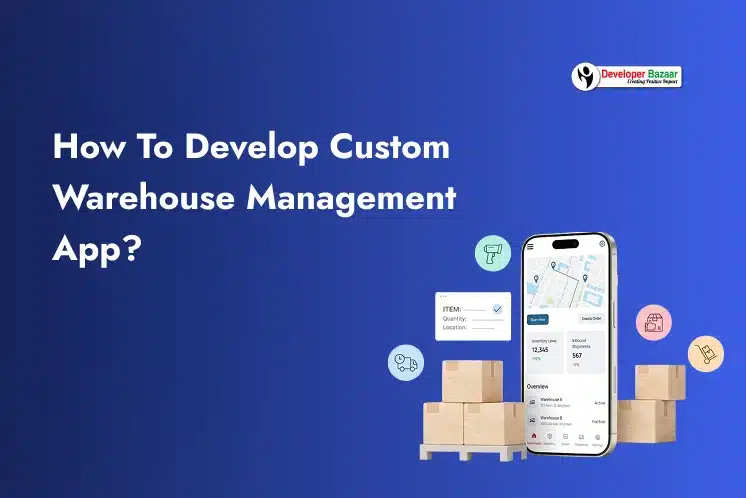
Businesses now manage large inventories, faster deliveries, multiple warehouses, and real-time order tracking. Manual processes and spreadsheets often create delays, stock errors, and higher operational costs. This is why many companies choose to develop warehouse management app solutions that match their exact business needs.
The global warehouse management system market is expected to grow from USD 4.04 billion in 2025 to USD 10.89 billion by 2031, at a CAGR of 17.98%. This growth reflects the rising demand for warehouse management app development and warehouse automation solutions worldwide.
In this blog, we will explain what a warehouse management system is, different types of warehouse management applications, who needs a custom WMS, why businesses choose to build warehouse management app, essential features, development process, and estimated development cost.
What is a Warehouse Management System?
A Warehouse Management System (WMS) is software that helps businesses manage warehouse operations from the moment products enter the warehouse until they are shipped to customers.
It helps companies organize inventory, track goods, manage warehouse workers, and automate daily tasks. Businesses use warehouse management software to improve accuracy, reduce manual work, and speed up operations.
A modern WMS usually includes:
- Web dashboard for managers
- Mobile app for warehouse workers
- Inventory tracking system
- Barcode or RFID scanner integration
- Reporting and analytics tools
- Third-party software integrations
The main goal of a WMS is to improve warehouse efficiency and reduce operational costs. Businesses can use warehouse software to:
- Track inventory in real time
- Reduce stock errors
- Improve order accuracy
- Manage warehouse staff
- Speed up shipping and delivery
- Optimize storage space
Today, many businesses prefer Warehouse management app development because custom solutions provide better flexibility, automation, and long-term scalability through mobile application development services.
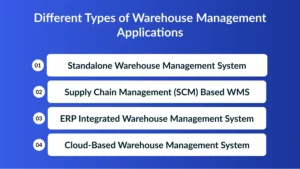
Different Types of Warehouse Management Applications
Businesses can choose different warehouse management systems based on their business size, operational needs, and budget. Below are the main types of warehouse management applications.
1. Standalone Warehouse Management System
A standalone WMS focuses only on warehouse operations like inventory tracking, barcode scanning, receiving, and shipping. It is a cost-effective option for small businesses, local distributors, and third-party logistics providers.
2. Supply Chain Management (SCM) Based WMS
An SCM-based warehouse system helps businesses manage warehouse operations along with procurement, transportation, inventory planning, and vendor management. It is suitable for companies that need complete supply chain visibility and better workflow management.
3. ERP Integrated Warehouse Management System
ERP-integrated warehouse systems combine warehouse management with accounting, HR, finance, and customer management tools. Businesses looking to build warehouse management software with advanced scalability and centralized operations often prefer ERP-based solutions.
4. Cloud-Based Warehouse Management System
Cloud-based warehouse software is hosted online and can be accessed from anywhere through the internet. Many businesses choose cloud solutions to create warehouse management app platforms because they offer lower costs, better scalability, automatic updates, and improved security using cross-platform application development approaches.
Who Needs a Custom Warehouse App Development?
Not every business can efficiently manage warehouse operations using ready-made software. Some businesses have unique workflows, inventory structures, or operational requirements that need custom solutions.
Custom warehouse app development is ideal for businesses that require flexibility, automation, and advanced integrations.
1. eCommerce Businesses
Online stores handle large order volumes daily. A custom warehouse app helps manage:
- Order processing
- Inventory updates
- Returns management
- Shipping operations
It also improves order accuracy and delivery speed.
2. Retail Businesses
Retailers managing multiple stores and warehouses need real-time inventory visibility.
Custom warehouse apps help retailers:
- Track stock across locations
- Reduce inventory shortages
- Improve stock forecasting
- Automate warehouse transfers
3. Third-Party Logistics (3PL) Providers
3PL companies manage inventory and shipping for multiple clients.
They often need:
- Multi-client inventory management
- Real-time shipment tracking
- Advanced reporting
- Client dashboards
This is why many logistics companies choose to develop warehouse management app solutions tailored to their operations.
4. Manufacturing Industry
Manufacturers need warehouse systems to manage:
- Raw materials
- Production inventory
- Finished goods
- Warehouse movement
A custom WMS helps manufacturers improve inventory accuracy and production planning.
5. Wholesale and Distribution Businesses
Wholesalers manage large inventory volumes and frequent shipments.
Custom warehouse systems help them:
- Track inventory movement
- Manage bulk orders
- Automate dispatching
- Improve warehouse efficiency
6. Businesses Managing Perishable or High-Value Goods
Industries such as healthcare, food, electronics, and pharmaceuticals need advanced inventory tracking and compliance monitoring.
A custom WMS can include:
- Expiry tracking
- Temperature monitoring
- Batch management
- Compliance reporting
Key Benefits of Developing a Warehouse Management System
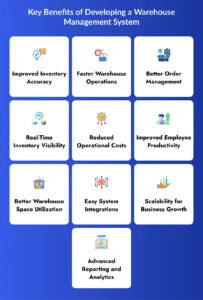
A warehouse management app has some key benefits that helps business to improve warehouse operations:
1. Improved Inventory Accuracy
A warehouse management system helps businesses track inventory in real time using barcode scanners and RFID technology. This reduces stock errors, prevents inventory loss, and improves overall inventory accuracy.
2. Faster Warehouse Operations
A custom WMS automates daily warehouse tasks like receiving, picking, packing, and shipping. This helps warehouse workers complete tasks faster and improves overall operational efficiency.
3. Better Order Management
Warehouse management software helps businesses process orders more accurately and quickly. It reduces shipping mistakes, improves delivery speed, and enhances customer satisfaction.
4. Real-Time Inventory Visibility
Businesses can monitor inventory levels, warehouse movement, and stock availability from a centralized dashboard. Real-time visibility helps companies make faster and smarter business decisions.
5. Reduced Operational Costs
A warehouse management system minimizes manual work, reduces inventory errors, and improves workforce productivity. This helps businesses lower operational and inventory management costs.
6. Improved Employee Productivity
Warehouse workers can manage tasks easily using mobile apps, barcode scanners, and automated workflows. This reduces confusion, saves time, and improves employee performance.
7. Better Warehouse Space Utilization
A WMS helps businesses organize products properly and optimize warehouse storage space. Proper inventory placement improves warehouse efficiency and reduces unnecessary movement.
8. Easy System Integrations
Custom warehouse systems can integrate with ERP software, eCommerce platforms, shipping systems, and accounting tools. This creates a centralized workflow and improves business operations.
9. Scalability for Business Growth
As businesses grow, warehouse operations become more complex. A scalable warehouse management system can support multiple warehouses, larger inventories, and increased order volumes easily.
10. Advanced Reporting and Analytics
Warehouse analytics tools help businesses track performance, monitor inventory trends, and identify operational issues. Reports and insights help improve decision-making and warehouse planning.
Step-by-Step Guide to Build a Warehouse Management System
Businesses should follow a structured development process to build a scalable and efficient warehouse management solution. Proper planning and development help improve warehouse operations, inventory accuracy, and overall business productivity.
1. Requirement Analysis
In this stage, the development team studies business workflows, warehouse operations, inventory processes, and integration needs. This helps define the project scope, required features, user roles, and overall development roadmap before the actual development begins. Businesses also plan future AI integration requirements to improve warehouse automation and operational intelligence.
2. UI/UX Design
The UI/UX design stage focuses on creating simple and user-friendly interfaces for warehouse managers and workers. Designers create dashboards, mobile app screens, warehouse workflow interfaces, and easy navigation systems. A well-designed interface improves employee productivity and makes warehouse operations faster and easier to manage.
3. Backend Development
Backend development involves building the core system that manages warehouse operations and data processing. Developers create the inventory database, APIs, user management system, security layers, and reporting modules. A strong backend ensures the warehouse app runs smoothly, securely, and efficiently even with large amounts of inventory data.
4. Third-Party Integrations
Third-party integrations help connect the warehouse app with other business systems and devices. Developers integrate ERP systems, shipping APIs, payment gateways, RFID devices, and barcode scanners to create a centralized workflow. These integrations improve data synchronization, automation, and overall operational efficiency.
5. Testing and Quality Assurance
The testing and quality assurance stage ensures the warehouse app works properly without errors or performance issues. QA teams test app performance, security, inventory accuracy, device compatibility, and user experience. Proper testing helps identify bugs early and ensures the application delivers a smooth and reliable experience.
6. Deployment and Maintenance
After successful testing, the warehouse app is deployed for business use. Developers continue to provide system monitoring, feature updates, bug fixes, and technical support after launch. Regular maintenance helps keep the warehouse management system secure, updated, and optimized for long-term business growth with modern AI development services.
Must-Have Features to Build a Warehouse Management App
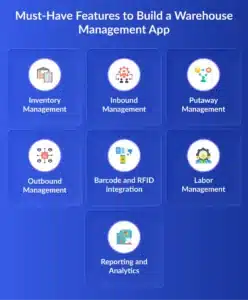
A successful warehouse management app should include features that improve inventory accuracy, automate warehouse operations, and simplify daily tasks for warehouse workers and managers.
1. Inventory Management
Inventory management is one of the most important features of a warehouse app. It helps businesses track stock levels, manage SKUs, monitor inventory history, and receive real-time stock alerts using barcode and RFID tracking.
3. Inbound Management
Inbound management helps warehouse workers handle incoming goods efficiently. It allows businesses to scan purchase orders, verify product quantity, perform quality checks, approve items, and report damaged products.
4. Putaway Management
Putaway management helps workers store products in the correct warehouse location after receiving them. Features like rack scanning, location tracking, and warehouse mapping improve storage accuracy and space utilization.
5. Outbound Management
Outbound management helps businesses manage order dispatch and shipment preparation. It includes features like order picking, packing management, shipment verification, delivery tracking, and dispatch scheduling.
6. Barcode and RFID Integration
Barcode and RFID integration improve inventory tracking and reduce manual entry errors. These technologies help businesses update inventory faster, track products in real time, and improve warehouse visibility.
7. Labor Management
Labor management features help warehouse managers assign tasks and monitor employee productivity. Businesses can track attendance, work progress, task completion, and workforce efficiency from a single dashboard.
8. Reporting and Analytics
Reporting and analytics tools help businesses analyze warehouse performance and identify operational improvements. Reports may include inventory status, shipment tracking, warehouse utilization, employee performance, and order accuracy.
Cost Estimation of Warehouse Management System
The cost to build warehouse management app solutions depends on multiple factors such as app complexity, features, integrations, and development location.
Below is an estimated cost breakdown.
| App Type | Estimated Cost |
| Basic Warehouse App | $15,000 – $30,000 |
| Mid-Level Warehouse Management System | $30,000 – $70,000 |
| Advanced Enterprise WMS | $70,000 – $150,000+ |
Factors Affecting Warehouse App Development Cost
App Features: More advanced features increase development time and cost.
Platform Selection: The cost depends on whether you build:
- Android app
- iOS app
- Web platform
- Cross-platform app
Businesses often choose scalable AI application development approaches for better performance across platforms.
Third-Party Integrations: ERP, CRM, shipping APIs, RFID systems, cloud integrations, and AI recommendation engines increase development complexity.
UI/UX Design: Custom designs and dashboards require additional development effort.
Development Team Location/; Development cost varies based on the country and the expertise level of the development company.
Conclusion
Warehouse operations are becoming more complex as businesses grow and customer expectations increase. Manual processes and disconnected systems can lead to inventory errors, delayed shipments, and operational inefficiencies.
This is why many companies now choose to develop warehouse management app solutions that improve inventory control, automate warehouse workflows, and increase productivity.
A custom warehouse system helps businesses manage receiving, inventory tracking, order fulfillment, shipping, reporting, and workforce management from a single platform. It also provides better scalability, integrations, and long-term flexibility compared to ready-made solutions.
Whether you want to develop a custom warehouse management app, investing in the right solution can improve operational efficiency and support long-term business growth.

FAQs
1. How long does it take to develop a warehouse management app?
The development timeline depends on the app’s complexity, features, and integrations. A basic warehouse management app may take 3–6 months, while advanced systems can take longer.
2. Can a warehouse management app work on mobile devices?
Yes, most modern warehouse systems include mobile applications for Android and iOS devices. Mobile apps help workers manage inventory, scanning, and warehouse tasks on the go.
3. Is cloud-based warehouse software better than on-premise software?
Cloud-based warehouse software offers better scalability, remote access, automatic updates, and lower maintenance costs. It is often more flexible and cost-effective for growing businesses.
4. Can a custom warehouse app integrate with existing business software?
Yes, custom warehouse apps can integrate with ERP systems, accounting software, shipping platforms, barcode scanners, and RFID devices for better workflow management.
5. What technologies are used in warehouse management app development?
Warehouse management systems commonly use technologies like cloud computing, barcode scanning, RFID, AI analytics, APIs, and mobile app frameworks for automation and real-time tracking.
6. Why should businesses choose custom warehouse management software?
Custom warehouse software provides better flexibility, scalability, and feature customization compared to ready-made solutions. It allows businesses to build workflows based on their operational needs.