

Suppose it’s Monday morning. You are still drinking your first coffee, and an AI agent has already solved customer tickets, checked expenses, and scheduled interviews.
This is not a dream anymore. It is real.
Today, AI has moved far beyond simple chatbots. Modern AI agents can think, plan, and take actions on their own. They are not waiting for any commands now, they work like digital employees.
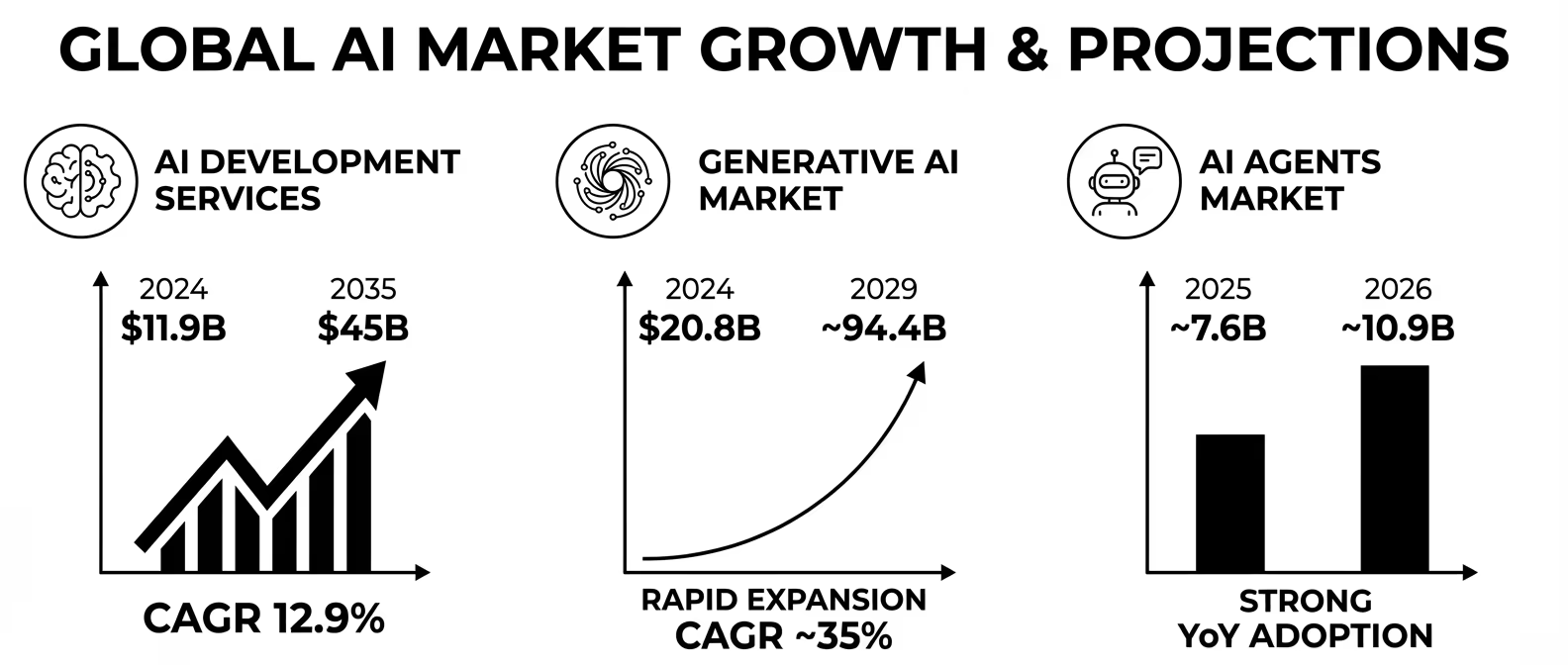
Leading research firms like Gartner, Forrester, and IDC predict that 2026 will mark the mainstream adoption of AI agents. However, they also caution that many organizations could struggle or fail without proper planning. Looking ahead, the impact is expected to deepen significantly. By 2027, agentic automation is projected to enhance capabilities in over 40% of enterprise applications.
So, understanding how to build an AI agent, where to use it, and what challenges to avoid is very important.
How AI Agents Create Business Value?
AI agents help businesses grow in three powerful ways: they save time, reduce costs, and increase revenue.
1. Save Time
AI agents can handle repetitive and time-consuming tasks very quickly. These are tasks that people usually do again and again, like checking emails, processing forms, or answering common questions.
For example, in a financial company, loan processing used to take 3 days because employees had to manually verify documents, check details, and approve applications. After they used AI agents, the same process took only 4 hours.
This means:
- Work gets done faster
- Employees can focus on important tasks
- Customers get quicker service
2. Reduce Cost
AI agents help companies save money by reducing manual work and minimizing errors.
Here’s how they do it:
- Automating simple tasks: Tasks like data entry, report generation, and answering FAQs can be done automatically. This reduces the need for extra staff.
- Reducing mistakes: Humans can make errors, especially in repetitive work. AI agents follow rules and reduce these mistakes.
- Using resources better: AI agents work 24/7 without breaks, so companies get more work done without increasing costs.
As a result, businesses spend less money and become more efficient.
3. Increase Revenue
AI agents also help businesses earn more money by improving customer experience.
For example, an e-commerce company used AI agents to suggest products based on what customers like. These personalized recommendations made customers more interested in buying.
Because of this, the company saw a 23% increase in sales.
This happens because:
- Customers get better suggestions
- They find products faster
- They enjoy the shopping experience
AI Agent Implementation Model
When you build an AI agent, it is best to follow a step-by-step approach. This helps reduce risk and ensures better results.
Step 1: MVP (Minimum Viable Product)
This is the basic version of your AI agent.
- Keep it small and simple
- Focus on solving one specific problem
- Test it with a small group of users
This step usually takes 4 – 6 weeks.
The goal here is to check:
“Is the AI agent actually useful?”
Step 2: Pilot
Once the MVP works well, you move to the pilot stage.
- Add more features
- Improve performance
- Test with more users or departments
At this stage, you start connecting the AI agent with real systems like CRM, databases, or tools used by your company.
Step 3: Scale
In this step, the AI agent is fully ready.
- It is used across the entire company
- It handles multiple tasks
- It works with different teams and systems
This is where businesses get the maximum value from AI agents.
How to Build AI Agents for Beginners?
If you want to build an AI agent, it’s important to follow a clear process. Each step helps you move from an idea to a working system that delivers real value.
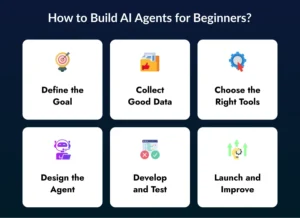
1. Define the Goal
The first step to create an AI agent is to clearly define its purpose. Without a clear goal, your AI agent may become confusing and ineffective.
Start by asking simple questions:
- What problem will this agent solve?
- Who will use it?
For example, your AI agent could be:
- A customer support agent who answers user questions
- An HR assistant who helps employees with policies and onboarding
When your goal is clear, it becomes easier to decide what features to build and how the agent should behave. A well-defined goal makes sure that your AI agent stays focused and useful.
2. Collect Good Data
To develop an AI agent, you need good-quality data because AI learns from data. If the data is wrong or messy, the AI will also give wrong results.
You should focus on:
- Clean data: Remove duplicates, errors, and irrelevant information
- Correct data: Make sure the data is accurate and updated
- Real examples: Use real-world interactions so the agent understands actual situations
For instance, if you are building a support agent, use real customer queries and responses.
In simple terms: Good data = Good AI agent performance
3. Choose the Right Tools
When you develop an AI agent system, selecting the right tools and technologies is very important. The tools you choose depend on what your AI agent needs to do.
Here are some common options:
- Language tools: Used for chat, text understanding, and conversations
- Vision tools: Used for image recognition and visual tasks
- Cloud or local setup: Cloud: Good for scalability and remote access
- Local (on-premise): Better for data privacy and control
Choosing the right tools helps you build faster, reduce errors, and improve performance.
4. Design the Agent
Before you start coding, you need to design how your AI agent will work. This step is like creating a blueprint.
You should clearly define:
- Input: How the agent will receive information. (e.g., text, voice, images)
- Processing: How the agent will understand and analyze the input.
- Output: What the agent will return. (e.g., answers, actions, reports)
You can design your system in two ways:
- Modular system: Break the agent into smaller parts and easy to update and fix.
- Real-time system: Works instantly and is best for live chat or instant responses
A strong design makes your AI agent more efficient, scalable, and easy to maintain.
5. Develop and Test
Now comes the actual development phase, where you develop an AI agent system.
This step includes:
- Writing the code for core features
- Connecting APIs and databases
- Adding memory so the agent can learn from past interactions
- Making sure all parts work together properly
Testing is a very important part of this stage. It ensures your AI agent works correctly in real-world situations.
There are three main types of testing:
- Unit testing: Test each small component separately
- Integration testing: Check how different parts work together
- Performance testing: Measure speed, accuracy, and stability
Proper testing helps you avoid errors and improves the overall quality of your AI agent.
6. Launch and Improve
After you build an AI agent, the process does not end. You need to launch it carefully and keep improving it over time.
Start with:
- Launching the agent for a small group of users
- Collecting feedback from real users
- Identifying problems and fixing them
Then move to:
- Improving performance and accuracy
- Adding new features based on user needs
- Scaling the agent to more users and departments
AI agents are not “built once and done.” They need continuous updates and improvements to stay useful and effective.
Avoid Common Myths & Challenges
Many people have wrong ideas about AI agents. These myths can lead to poor decisions and failed projects. Let’s only understand the truth behind them.
Myth 1: AI agents don’t need humans
Some people think that once you build an AI agent, it can run completely on its own without any human help. This is not true.
In reality, AI agents work best when humans are involved. They need guidance, supervision, and control to make sure everything runs correctly. AI can make decisions, but it may not always understand context perfectly.
So, companies use:
- Human supervision to check important decisions
- Feedback systems to improve results
- Fallback options when AI is unsure
AI works best as a helper, not as a replacement for humans.
Myth 2: AI agents replace jobs
Many people worry that AI agents will take away jobs. This is also a misunderstanding.
AI agents are built to augment human capabilities, not to replace them. They handle repetitive and boring tasks so that humans can focus on creative and strategic work.
For example:
- AI can answer common customer questions
- Humans can handle complex issues and decision-making
This means:
- Employees become more productive
- Work becomes more meaningful
- Businesses grow faster
So, AI agents act like digital assistants, not job killers.
Myth 3: You can plug and play AI agents
Some people believe they can just install an AI agent and it will start working perfectly. This is not true.
To develop an autonomous AI agent, you need a proper setup and preparation. AI agents must be connected to your systems and trained with your business data.
This requires:
- Data: The agent needs access to relevant and clean data
- Integration: It must connect with tools like CRM, ERP, or databases
- Business rules: It should follow company policies and workflows
Without these, the AI agent will not work properly. Building an AI agent demands careful planning and dedicated effort.
Real Challenges You May Face
When you build an AI agent, you may face several real-world challenges. Understanding these challenges early helps you plan better and avoid costly mistakes later.
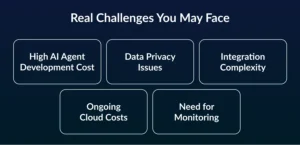
1. High AI Agent Development Cost
AI Agent development cost can be expensive, especially when you are creating advanced or large-scale systems. The cost is about coding only. It also includes multiple factors such as model selection, development tools, cloud infrastructure, and fine tunning.
For example, you required to spend money on:
- Development tools and technologies
- Cloud servers to run the AI agent
- Regular updates and improvements
Because of these costs, most companies do not start big. Instead, they begin with a small version (MVP) and slowly scale as they see results.
2. Data Privacy Issues
AI agents rely heavily on data, and in many cases, this data can be sensitive, such as customer details, financial information, or personal records.
This creates a big responsibility for businesses. They must ensure that:
- User data is properly protected
- Systems follow legal and compliance rules
- Strong security measures are in place
If data privacy is ignored, it can lead to serious problems like data leaks, legal penalties, and loss of customer trust.
3. Integration Complexity
AI agents do not work alone. They need to connect with existing systems like databases, CRMs, and internal tools to perform tasks effectively.
However, this integration can be challenging because:
- Different systems may not be compatible
- Data formats may not match
- APIs can be complex to connect and manage
Without proper planning, integration can become slow and difficult. That’s why companies need a clear strategy to ensure smooth communication between systems.
4. Ongoing Cloud Costs
AI agents run continuously and require computing power all the time. This leads to ongoing costs that businesses must manage carefully.
These costs come from:
- High API usage
- Continuous cloud computing
- Data processing and storage
If not monitored properly, these costs can grow quickly. Smart companies track usage and optimize resources to keep expenses under control.
5. Need for Monitoring
AI agents are not systems that you build once and forget. They require continuous monitoring and improvement to stay effective.
Businesses need to:
- Regularly check performance
- Track accuracy and response time
- Improve the system based on feedback
Successful companies also track ROI (Return on Investment). If an AI agent is not delivering value, they improve it or stop using it. This ensures that only useful and efficient systems are kept.
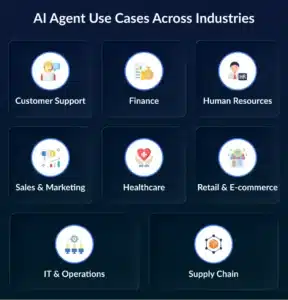
AI Agent Use Cases Across Industries
AI agents are used in many industries to make work faster, easier, and more efficient. They help businesses automate tasks, reduce errors, and improve overall performance. Let’s understand how they are used in different areas with clear and complete points.
1. Customer Support
In customer support, AI agents act like virtual assistants that respond to customer queries instantly. Instead of waiting for a human agent, customers get quick and accurate answers at any time.
AI agents can:
- Answer common customer questions instantly, 24/7, without any delay.
- Handle refund requests and resolve customer complaints efficiently.
- Sort, categorize, and prioritize support tickets based on urgency.
This reduces the workload on human agents and improves customer satisfaction.
Result: Businesses save 40+ hours per month and provide faster and better support.
2. Finance
In the finance industry, accuracy and security are very important. AI agents help by managing complex financial tasks quickly and with fewer errors.
They can:
- Automatically process expense reports and verify transactions.
- Detect fraud by identifying unusual patterns in financial data.
- Manage tax calculations and ensure compliance with financial regulations.
This improves both speed and safety in financial operations.
Result: Faster, more accurate, and secure financial processes.
3. HR (Human Resources)
HR teams handle many repetitive and time-consuming tasks. AI agents help automate these tasks and improve the overall employee experience.
They assist in:
- Screening candidates and shortlisting the best profiles during hiring.
- Managing onboarding processes for new employees smoothly.
- Answering employee queries related to policies, benefits, and procedures.
This saves time and allows HR teams to focus on strategic activities.
Result: Faster hiring processes and happier employees.
4. Sales & Marketing
AI agents help businesses grow by improving how they attract, engage, and convert customers.
They can:
- Find and qualify potential leads based on customer data and behavior.
- Send personalized messages and follow-ups to engage customers.
- Recommend products based on user preferences and past activity.
This increases the chances of converting leads into customers.
Result: 2 – 3x faster sales growth and better conversion rates.
5. Healthcare
In healthcare, AI agents support doctors and medical staff by handling both medical and administrative tasks.
They can:
- Assist doctors by providing suggestions based on patient data and symptoms.
- Schedule patient appointments and manage hospital workflows.
- Analyze medical reports to help in faster diagnosis.
This helps doctors make better decisions and saves time.
Result: Faster treatment and improved patient care.
6. Retail & E-commerce
AI agents improve both business operations and customer experience in retail and e-commerce.
They can:
- Predict product demand based on past sales and market trends.
- Organize and tag products automatically in online catalogs.
- Recommend personalized products to customers based on their behavior.
This helps businesses increase sales and manage inventory efficiently.
Result: Higher sales and fewer stock-related issues.
7. IT & Operations
AI agents help IT teams by automating routine technical tasks and continuously monitoring systems.
They can:
- Reset user passwords automatically without manual intervention.
- Fix common technical issues using predefined solutions.
- Monitor systems in real-time and detect problems early.
This reduces the workload on IT teams and improves system performance.
Result: Faster issue resolution and reduced operational burden.
8. Supply Chain
AI agents make supply chain operations smarter by predicting issues and improving efficiency.
They can:
- Predict machine failures before they happen using data analysis.
- Optimize delivery routes to ensure faster and cost-effective shipping.
This helps businesses avoid delays and reduce operational costs.
Result: Lower costs and faster delivery times.
These use cases show how businesses across industries can build an AI agent to improve efficiency, reduce workload, and achieve better results.

Conclusion
AI agents are transforming the way businesses operate in 2026. They are becoming digital teammates that can think, act, and solve problems. When you build an AI agent, you are not just automating tasks, you are improving speed, accuracy, and overall efficiency.
However, success comes from using AI in the right way. Businesses need to start with clear goals, use good data, and follow a step-by-step approach to develop an AI agent system. At the same time, they must be aware of challenges like cost, data privacy, and system integration.
The companies that win will be the ones that treat AI as a long-term investment. They will test, improve, and scale their AI agents carefully. Whether you want to create an AI agent for customer support, finance, or operations, the key is to focus on real use cases and measurable results.
FAQs
1. How do AI agents differ from traditional chatbots?
AI agents are more advanced than traditional chatbots. While chatbots mainly respond to questions, AI agents can think, plan, and take actions on their own. They can handle multi-step tasks and make decisions based on context, which makes them more powerful and useful for businesses.
2. How much time does it take to build an AI agent?
The time depends on the complexity of the project. A basic AI agent (MVP) can take around 4–6 weeks, while advanced systems may take several months. The timeline also depends on data availability, integrations, and features required.
3. Is it necessary to hire an AI Development Company?
For simple projects, you can use no-code tools or small teams. However, for complex systems, working with an AI development company or using AI Agent development services helps in better quality, faster development, and proper system integration.
4. What factors affect AI Agent Development Cost?
The cost depends on multiple factors like project complexity, technology used, data requirements, and infrastructure. Advanced features like automation, integrations, and real-time processing can increase the overall cost significantly.
5. Can small businesses also develop AI agents?
Yes, small businesses can also develop an AI agent by starting with simple use cases like customer support or marketing automation. They can begin with low-cost solutions and scale gradually as they see results.
6. How do AI agents improve business productivity?
AI agents handle repetitive and time-consuming tasks automatically. This allows employees to focus on more important and creative work. As a result, businesses become faster, more efficient, and more productive.
7. Are AI agents safe to use in business operations?
AI agents are safe if they are built and managed properly. Businesses must ensure strong security, data protection, and regular monitoring. With the right setup, AI agents can operate securely and reliably.