


Enterprise spending on large language models (LLMs) is accelerating rapidly alongside overall market growth. With the market valued at USD 8.31 billion in 2025 and projected to reach USD 24.92 billion by 2031 at a CAGR of 20.08%, enterprise investment is scaling in parallel.
In fact, model API costs alone crossed $8.4 billion by mid-2025, and with ongoing infrastructure advancements like NVIDIA Blackwell and AWS Trainium2 reducing deployment costs, a growing number of organizations are actively expanding their AI budgets and accelerating LLM adoption.
But there is a big concern i.e., data privacy. Many businesses don’t want their sensitive data to go to external servers. That’s why self-hosting LLMs is becoming popular.
Self-hosting gives full control over data, but it also brings cost and complexity. In this guide, you’ll learn:
- What self-hosted LLMs are
- The real Self Hosting LLMs Cost
- Tools you can use
- And how to Optimize Self-Hosting LLMs Cost
What Is a Self-Hosted LLM?
A self-hosted LLM (Large Language Model) is an AI model that you run on your own infrastructure instead of using someone else’s cloud service.
In general, instead of sending your data to platforms like OpenAI or other providers, you keep everything inside your own system. The model is installed and runs on your servers, your data center, or your private cloud environment.
This gives you full control over how the model works and how your data is handled.
What does this actually mean?
Runs on your infrastructure: The model is hosted on your own machines, whether it’s a local server, on-premise setup, or a private cloud.
Your data stays private: All inputs (prompts) and outputs remain inside your system. Nothing is shared with external providers.
No third-party involvement: You don’t depend on external APIs, so there’s no risk of data being stored, monitored, or used by another company.
Simple Comparison of Different Approaches
| Approach | Where It Runs | Data Privacy | Cost Model |
| API (OpenAI, etc.) | External cloud | Low (data goes outside) | Pay per usage |
| Managed Platform | Cloud or VPC | Medium (depends on provider) | Subscription or usage-based |
| Self-Hosted | Your own system | High (data stays with you) | One-time hardware + maintenance |
Why is Self-Hosting an LLM Needed?
Organizations choose to self-host LLMs for several important reasons. Below, we have mentioned a few reasons:
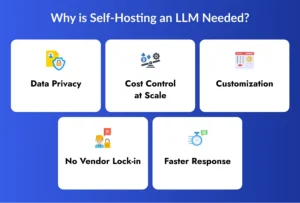
1. Data Privacy
When you use external APIs, your data is sent to another company’s servers. Even if they promise security, your information is still outside your control.
With self-hosting, everything stays inside your system. Your prompts, responses, and sensitive data never leave your environment.
This is especially important for industries like healthcare, finance, and legal services, where data privacy is required by law.
2. Cost Control at Scale
API-based models charge you based on usage, usually per token. This works well for small projects, but costs increase quickly if you use the model frequently.
With self-hosting, you invest in hardware and set up once. After that, you can run as many requests as your system can handle without paying per use.
This helps reduce the long-term cost of self-hosted AI models, especially for businesses with high and regular usage.
3. Customization
When you use external APIs, you get a general-purpose model. You have limited control over how it behaves.
Self-hosting allows you to train the model using your own data. This means you can build a model that understands your business, your customers, and your specific needs.
This makes it easier to build custom LLM Application that performs better for your use case.
4. No Vendor Lock-in
When your system depends on a third-party API, you are tied to that provider. They can change pricing, limit usage, or update policies at any time.
Self-hosting removes this dependency. You are free to choose models, tools, and infrastructure as you like. This gives you more flexibility and long-term stability for your AI projects.
5. Faster Response (Low Latency)
When using cloud APIs, every request travels over the internet to external servers and then back to you. This adds delay.
With self-hosted models, everything runs locally or within your private network. This reduces response time significantly. Faster responses are very important for real-time applications like chatbots, internal tools, or customer support systems.

How to Optimize Self-Hosting LLMs Cost in 2026
Self-hosting LLMs can become expensive if not managed properly. However, with the right strategies, you can significantly reduce your overall expenses without affecting performance.
By making smart choices in models, infrastructure, and tools, businesses can effectively optimize self-hosting LLMs Cost and get better value from their AI investments.
1. Use Smaller Models
You don’t always need large and complex models for every task. Many smaller models can perform well for specific use cases like chatbots, summaries or internal tools. Smaller models require less memory and computing power, which directly reduces hardware and electricity costs. This makes them a cost-effective choice for many applications.
2. Quantization
Quantization is a technique that reduces the size of a model by lowering the precision of its calculations. This helps the model use less memory and run faster. As a result, you can run models on cheaper hardware and still maintain good performance, which helps lower the overall self-hosted AI models cost.
3. Batch Processing
Instead of processing one request at a time, batch processing allows you to handle multiple requests together. This improves resource utilization. By increasing efficiency, you can serve more users with the same hardware, reducing cost per request and improving overall system performance.
4. Use Spot Instances
Cloud providers offer spot or discounted instances at lower prices compared to regular servers. These are ideal for non-critical or flexible workloads. Using these instances can significantly reduce infrastructure costs, especially when you don’t need continuous uptime for your LLM workloads.
5. Auto Scaling
Auto scaling allows your system to automatically increase or decrease resources based on demand. You only use resources when needed. This prevents overpaying for idle servers and plays a key role in optimizing self LLM cost, especially for applications with variable traffic.
6. Choose the Right Framework
The tools and frameworks you use can greatly impact performance and cost. Efficient frameworks reduce memory usage and improve processing speed. Choosing the right solution ensures better utilization of resources, helping you lower operational costs while maintaining high performance.
Some Powerful Tools for Self-Hosting LLMs
Some tools are simple and beginner-friendly, while others are built for high performance or enterprise use.
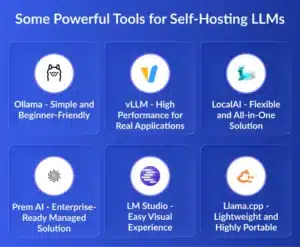
1. Ollama – Simple and Beginner-Friendly
Ollama is one of the easiest tools available for self-hosting LLMs. It is designed for people who want to start quickly without worrying about technical complexity.
With Ollama, you don’t need to manually configure models, drivers or dependencies. It handles everything in the background. You just run a simple command, and the model starts working on your system.
This makes it a great choice for developers who are learning, testing ideas, or building small applications. It is also useful for privacy-focused users who want a local AI assistant.
However, Ollama is not built for heavy workloads. It can handle only a limited number of users at the same time. So, while it is perfect for starting, it may not be the best choice for large-scale applications.
2. vLLM – High Performance for Real Applications
vLLM is designed for speed and scalability. It is used when your application needs to serve many users at the same time without slowing down.
Unlike simple tools, vLLM uses advanced memory management techniques to improve performance. This allows it to process many requests together, making it much faster and more efficient.
If you are building a chatbot, customer support system or any application where many users interact at once, vLLM is a strong choice. It helps maintain fast response times even under heavy load.
The downside is that it requires more setup. You need GPUs, proper configuration, and some technical knowledge. But in return, you get much better performance and lower cost per request at scale.
3. LocalAI – Flexible and All-in-One Solution
LocalAI acts like a bridge between your applications and different AI models. It provides a single API that works similar to OpenAI, but everything runs locally on your system.
What makes LocalAI powerful is its flexibility. It can handle different types of tasks like text generation, image creation, audio processing and embeddings, all in one place.
This means you don’t need separate tools for different AI features. You can manage everything through one system, which simplifies development and reduces complexity.
LocalAI is a good choice if you are building applications that need multiple AI capabilities or if you want to replace external APIs without changing much of your existing code.
4. Prem AI – Enterprise-Ready Managed Solution
Prem AI is built for companies that want the benefits of self-hosting but don’t want to manage the technical challenges.
In a typical self-hosting setup, you need to handle infrastructure, scaling, updates and performance tuning. This requires a skilled team and ongoing effort. Prem AI removes this burden by offering a managed solution that runs on your own infrastructure.
It helps strong data privacy, which is important for industries with strict regulations. At the same time, it provides optimized performance without requiring a deep technical setup.
This makes Prem AI ideal for enterprises that want a balance between control and convenience. It is especially useful for organizations that need secure and scalable AI systems without building everything from scratch.
5. LM Studio – Easy Visual Experience
LM Studio is designed for users who prefer a visual interface instead of command-line tools. It provides a clean and simple dashboard where you can download, run, and test models easily.
You don’t need to write commands or configure systems manually. Everything can be managed through clicks, which makes it very beginner-friendly.
It is especially useful for non-technical users, researchers, or teams who want to experiment with different models quickly. While it is easy to use, it is not designed for large-scale production systems. It works best for testing, learning, and small use cases.
6. Llama.cpp – Lightweight and Highly Portable
llama.cpp is a powerful and flexible tool that focuses on efficiency and portability. It allows you to run LLMs on devices that don’t have powerful GPUs.
This means you can run models on laptops, CPUs, or even small devices like embedded systems. It is widely used for edge computing, where running AI locally is necessary.
However, llama.cpp requires more manual work. You need to handle model setup, optimization, and integration yourself. It gives you full control, but it also requires more effort.
This tool is best suited for developers who want maximum flexibility or need to deploy AI in low-resource environments.
Which Tool Should You Choose for Self-Hosting LLMs?
Some tools are best for learning and experimentation, while others are designed for high performance or enterprise-level deployment. If you choose the right tool from the beginning, you can save time, reduce complexity, and better manage your self-hosting LLM costs.
1. If You Are a Beginner
If you are new to LLMs or just want to experiment, you should start with simple and easy-to-use tools like Ollama or LM Studio.
These tools are designed to remove technical barriers. You don’t need deep knowledge of infrastructure, GPUs, or deployment pipelines. You can install them quickly and start running models within minutes.
They are perfect for:
- Learning how LLMs work
- Testing ideas
- Building small personal or internal tools
Because the setup is simple and fast, you can focus more on understanding the model instead of worrying about configuration.
2. If You Are Building Production Applications
When you move from testing to building real applications, your needs change. You now need better performance, faster responses, and the ability to handle multiple users at the same time.
In this case, tools like vLLM or LocalAI are better choices.
These tools are built for:
- High performance and speed
- Handling concurrent users
- Scaling applications as demand grows
vLLM focuses more on performance and efficiency, making it ideal for applications with heavy traffic. LocalAI, on the other hand, offers more flexibility by supporting multiple types of AI workloads through a single API.
Although these tools require more setup and technical knowledge, they help you build reliable and scalable systems while keeping your self-hosted AI models’ costs under control.
3. If You Are an Enterprise
For enterprises, the priority is not just performance—it is also security, compliance, and operational efficiency. Managing infrastructure, updates, and scaling can become complex and expensive.
This is where tools like Prem AI come in.
Prem AI provides a managed self-hosting solution that runs within your own infrastructure while handling the heavy lifting for you. This means:
- Strong data privacy and compliance support
- No need to manage complex infrastructure
- Reduced engineering effort
It is especially useful for industries with strict regulations, such as healthcare, finance, and legal sectors.
By using a managed platform, enterprises can focus on building AI solutions rather than managing systems, helping optimize self-LLM costs over time.
What Is the Real Cost of Self-Hosting an LLM in 2026?
Understanding the real self hosting LLMs cost is not simple. The total cost depends on how you host the model, how much you use it, and what level of performance you need.
In 2026, self-hosting costs fall into three main tiers. Each tier has a different cost structure of self-hosting LLMs and is suitable for different use cases.
1. Personal or On-Premise Setup
This is the cheapest way to start. You run the model on your own machine or office setup.
- Upfront cost: $2,000 – $8,000 (for GPUs or high-end systems)
- Monthly cost: $15 – $80 (mainly electricity)
- Best for: Learning, testing, small apps
These setups can run smaller or optimized models. They are great if you want to build custom LLM application without spending too much.
However, performance is limited, and they are not ideal for handling many users.
2. Dedicated Servers or Colocation
This is a balance between cost and performance. You rent or own powerful GPU servers.
- Monthly cost (rented): $4,000 – $10,000
- Upfront (owned hardware): $35,000+
- Extra cost: Data center space, power, and networking
This setup is suitable for businesses that need stable performance and predictable costs.
It is widely used for production systems where companies want control but also need scalability. This tier often gives the best balance in self-hosting LLM cost comparison.
3. Cloud GPU Hosting
Cloud providers offer powerful GPUs on demand.
- Hourly cost: $3.50 – $14 per hour
- Monthly cost: ~$2,000 – $6,000+ (continuous usage)
You don’t need to buy hardware, and you can scale up or down anytime. This is useful for startups or businesses with changing workloads. However, long-term costs can become high compared to owned infrastructure.

The Hidden Costs: Electricity, Cooling, and Maintenance
When businesses calculate the self-hosted AI models cost, they often focus only on hardware. But in reality, several hidden costs can significantly increase the total expense over time.
If you ignore these factors, your actual spending can go much higher than expected.
1. Electricity and Cooling
Running LLMs requires powerful GPUs, and these machines consume a large amount of electricity.
High-end GPUs can use anywhere between 400W to 700W when running continuously. Over a full month, this adds up to a noticeable electricity bill. On average, you may spend around $50 to $150 or more per GPU every month, depending on usage and local electricity rates.
But electricity is not the only concern. These GPUs generate a lot of heat, especially when running at full capacity. To keep systems stable and avoid overheating, you need proper cooling solutions like air conditioning or data center cooling systems.
Cooling can increase your total energy cost by 40% to 80%. This means your actual monthly expense can be much higher than just the power consumption alone.
If you don’t plan for electricity and cooling in advance, it becomes difficult to optimize Self-Hosting LLMs Cost, and your budget may quickly go out of control.
2. Maintenance and Monitoring
Self-hosting is not a one-time setup. Once your LLM is running, it requires continuous maintenance to ensure everything works smoothly.
You need to regularly update models, fix bugs, and improve performance. Over time, new model versions and optimizations become available, and you must keep your system up to date to stay competitive.
Monitoring is equally important. You need to track system health, GPU usage, latency, and errors to avoid downtime. Even though many monitoring tools are free or open-source, setting them up and managing them takes effort.
while software tools may not cost much, the time and attention required to maintain them adds to your overall self-hosting LLMs cost.
3. Engineering and Staffing
This is often the highest and most underestimated cost in self-hosting.
To run and manage LLM infrastructure, you need skilled professionals such as DevOps or MLOps engineers. These experts handle deployment, scaling, monitoring, troubleshooting, and system optimization.
Hiring or allocating such talent can cost around $3,000 to $6,000 per month, depending on experience and location.
Many companies ignore this cost in the beginning. As a result, they face performance issues, downtime, or inefficient systems later. This directly impacts their ability to optimize self-LLM cost-effectively.
Self-Hosted LLM Costs vs. API Pricing in 2026
To understand whether self-hosting is worth it, you need to compare it with API-based pricing. Both options have different cost models, and the better choice depends mainly on how much you use the model.
API Pricing in 2026 (Approximate)
Most AI providers charge based on the number of tokens you use. This means the more you use the model, the more you pay.
Here’s a simple idea of current pricing:
- OpenAI GPT models: around $2 to $8 per 1 million tokens
- Anthropic Claude models: around $3 to $15 per 1 million tokens
- Open-source model APIs: around $0.20 to $0.60 per 1 million tokens
At first, this looks affordable. But as usage increases, costs grow quickly because pricing is directly linked to volume.
Monthly Cost Comparison
| Usage Level | API Cost (Approx.) | Self-Hosted Cost (Approx.) |
| Low (1M tokens/day) | $150 – $500/month | ~$2,000/month |
| Medium (10M tokens/day) | $1,500 – $5,000/month | ~$2,000/month |
| High (100M+ tokens/day) | $15,000+/month | ~$2,000/month |
What This Means
- For low usage: APIs are much cheaper because you only pay for what you use.
- For medium usage: Costs start getting closer, and self-hosting becomes more competitive.
- For high usage: Self-hosting becomes significantly cheaper because your cost stays mostly fixed, while API costs keep increasing.
Key Takeaways and Recommendations
Self-hosting LLMs is a powerful option, but it is not the right choice for everyone. To make the best decision, you need to clearly understand your usage, budget, and technical capabilities.
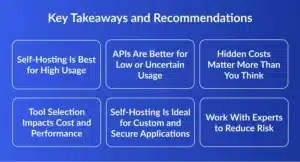
1. Self-Hosting Is Best for High Usage
If your application processes a large number of tokens daily (especially above 10M tokens/day), self-hosting becomes more cost-effective. In such cases, you can significantly reduce your self-hosting LLMs cost compared to API pricing, because your costs become more fixed instead of increasing with usage.
2. APIs Are Better for Low or Uncertain Usage
If your usage is low or unpredictable, APIs are a smarter choice. You only pay for what you use, and there is no need to invest in infrastructure or maintenance. This helps you avoid unnecessary upfront costs and operational complexity.
3. Hidden Costs Matter More Than You Think
Many businesses only consider hardware, but the real cost structure of self-hosting LLMs includes:
- Electricity and cooling
- Maintenance and monitoring
- Engineering and staffing
Ignoring these can lead to higher-than-expected self-hosted AI models cost.
4. Tool Selection Impacts Cost and Performance
Choosing the right tools (like Ollama, vLLM, or managed platforms) directly affects performance and cost efficiency. Using optimized tools helps in optimizing self LLM cost and ensures better scalability.
5. Self-Hosting Is Ideal for Custom and Secure Applications
If your goal is to build custom LLM Application with strict data privacy and full control, self-hosting is the best approach. It is especially important for industries like healthcare, finance, and legal services.
6. Work With Experts to Reduce Risk
Self-hosting requires strong technical expertise. Without proper planning, costs can increase and performance may suffer. This is where working with an experienced LLM Development Company, Developer Bazaar Technologies can make a big difference.
They offer end-to-end LLM Development Services, including:
- Infrastructure setup
- Model selection and deployment
- Performance optimization
- Cost optimization strategies
By partnering with experts, businesses can reduce risk, speed up development, and effectively optimize the cost of self-hosting LLMs.

FAQs
1. What is the average self-hosting LLM cost in 2026?
The self-hosting LLMs cost can vary widely depending on your setup and usage. Small projects may cost around $200 per month, while large enterprise deployments can exceed $10,000 per month. The final cost depends on factors like hardware, infrastructure, model size, and how frequently the system is used.
2. What is the highest cost in self-hosting LLMs?
The largest expenses in self-hosting are typically GPU hardware and engineering resources. High-performance GPUs are expensive, and skilled professionals are needed to manage them.
In many cases, staffing and maintenance costs can even exceed the initial infrastructure investment.
3. Do I need a technical team for self-hosting?
Yes, self-hosting requires a technical team with DevOps or MLOps expertise to manage deployment, scaling, and maintenance. Without proper knowledge, it becomes difficult to maintain performance, security, and system stability.
4. Can small businesses self-host LLMs?
Yes, small businesses can start with affordable setups and gradually scale as their needs grow. Modern tools make it easier to experiment with limited budgets. However, they should carefully plan their infrastructure and costs to avoid unexpected expenses.
5. When should I switch from API to self-hosting?
You should consider switching when your usage becomes high, stable, and predictable. This usually happens when you process more than 5M – 10M tokens per day. At this stage, self-hosting can offer better cost savings and more control over your system.
6. Should I hire an AI Development Company?
Working with an AI development company can help you avoid costly mistakes. They can guide you through setup, deployment, and optimization. Using professional LLM development services for faster development, better performance, and more efficient cost management.