


Key Takeaways:
- Building an LLM agent is easier when you start with one well-defined task instead of trying to automate everything at once.
- Most businesses can build powerful AI agents using pre-trained LLMs without training a new model from scratch.
- Tools, memory, and planning loops are the three core components that transform a basic chatbot into an intelligent AI agent.
- Testing with real user scenarios and adding guardrails are essential for creating safe, accurate, and reliable AI agents.
- Development costs depend on the agent’s complexity, but optimizing token usage and choosing the right infrastructure can significantly reduce long-term expenses.
- Partnering with experienced LLM development experts can help businesses launch AI agents faster while avoiding common technical and operational challenges.
Introduction: Why LLM Agents Matter Right Now
Imagine you had a helper who never got tired, never forgot instructions, and could work on many tasks at the same time. That is what an LLM agent does. It is not a chatbot that answers questions. It is a smart worker that can plan, use tools, and finish a job step by step.
In 2026, AI agents are running inside real companies, real apps, and real websites. Businesses everywhere are racing to build LLM agents because they save time, cut costs, and work 24*7.
Here are some numbers that show how fast this is growing:
- 57.3% of organisations now run AI agents in live production, up from 51% just a year earlier.
- 40% of enterprise apps are expected to have their own task-specific AI agent by the end of 2026, up from less than 5% in 2024.
- According to Gartner, global AI spending is set to touch $2.52 trillion in 2026, a 44% jump from the year before.
- AI agents could add between $2.6 trillion and $4.4 trillion in business value every year, once fully adopted.
This guide will teach you how to develop your first LLM-powered agent from the idea stage to the finished product.
What Is an LLM Agent?
Think of a normal chatbot like a person who can only answer questions when you ask them. It has no memory of what happened before, and it cannot do anything outside the chat window.
An LLM agent is different. It is like a smart assistant that can:
- Understand a user’s request (such as finding the cheapest flight to Delhi next week).
- Break the goal into small steps
- Use tools, such as a search engine, a calculator, or an app, to complete each step
- Remember what it already did
- Check its own work and try again if something goes wrong
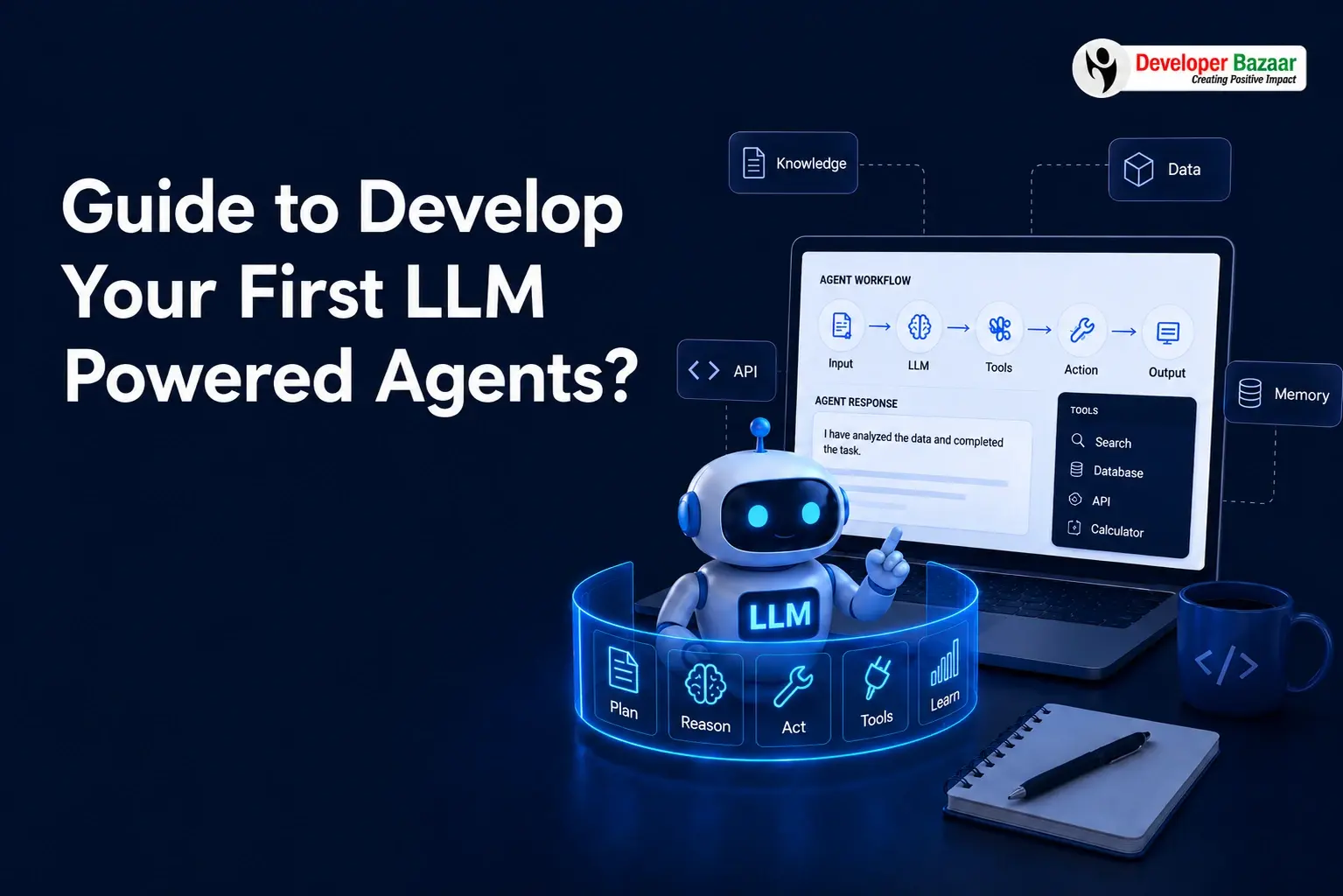
This loop of thinking, acting, and checking is what separates a simple chatbot from a true AI agent. NVIDIA describes this loop as the core building pattern behind every working LLM agent, no matter how big or small.
The Building Blocks You Need Before You Start Developing LLM Agent
Before you start developing LLM agents, you need to gather four basic parts. Think of these like ingredients before cooking a meal.
| Building Block | What It Does | Simple Example |
| Brain (LLM) | Understands language and makes decisions | GPT, Claude, Gemini, or an open-source model |
| Memory | Stores past chats and facts so the agent does not forget | A database or vector store |
| Tools | Let the agent take real actions | Web search, calculator, email sender, CRM lookup |
| Planner (Loop) | Decides what step comes next | A reasoning loop that plans, acts, and checks results |
Once you understand these four blocks, developing your first agent becomes easy. You are simply connecting these pieces in a smart order.
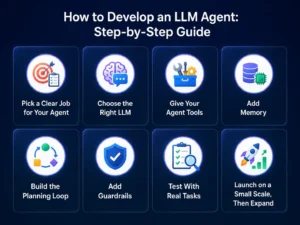
How to Develop an LLM Agent: Step-by-Step Guide
Follow this simple step-by-step process to develop an LLM agent. Make sure to test your agent after each stage to catch errors early and improve its performance.
Step 1: Pick a Clear Job for Your Agent
Do not try to build an agent that “does everything.” Pick one clear job, such as answering customer questions, checking inventory, or writing short reports. Keeping your agent focused makes it easier to develop and manage.
Step 2: Choose the Right LLM
This is the brain of your agent. You can use a ready-made model through an API (like GPT or Claude) or a self-hosted open model (like Llama or DeepSeek). For your first agent, an API-based model is the fastest and safest way to start.
Step 3: Give Your Agent Tools
Tools help your LLM agent perform real tasks instead of only generating text. These tools can be simple, like a calculator, or advanced, such as connecting to your CRM or database. Start with just two or three essential tools and add more as your agent grows.
Step 4: Add Memory
Memory allows your agent to remember earlier steps in a task and even past conversations with the same user. Short-term memory (within one task) is a must. Long-term memory (across many sessions) is optional for your first build.
Step 5: Build the Planning Loop
This is the core of every LLM agent. It follows a simple process: the agent understands the goal, decides what to do next, uses a tool if needed, checks the result, and repeats these steps until the task is complete. This process is known as the “Reason, Act, Observe” loop.
Step 6: Add Guardrails
Guardrails stop your agent from doing something wrong or unsafe. Set clear rules, like “never send money without human approval” or “never share private data.” Tray.ai points out that even the best agents need clear boundaries, or they can take actions no one asked for.
Step 7: Test With Real Tasks
Test your agent with real-world tasks and see how it performs. Check if it gets confused, gives incorrect answers, or repeats the same steps. Fix one issue at a time to improve its performance.
Step 8: Launch on a Small Scale, Then Expand
Start by releasing your LLM agent to a small group of users. Monitor how it performs, gather feedback, and fix any issues. Once it works well, you can confidently launch it for more users. This approach helps protect your business and provides a better user experience.
5 Common Approaches to Build LLM Agents
There is more than one way to create LLM agents. Here are five popular approaches, each suited to a different level of skill and budget.
| Approach | Best For | Difficulty |
| Prompt-only agent | Simple Q&A tasks, quick prototypes | Easy |
| Tool-using agent | Tasks needing real actions, like search or booking | Medium |
| RAG-based agent | Answering from your own documents or knowledge base | Medium |
| Multi-agent system | Complex jobs are split across many smaller agents | Hard |
| Fine-tuned agent | Very specific, high-accuracy industry tasks | Hard |
Most beginners should start with a prompt-only or tool-using agent. Once that works well, you can move up to RAG-based or multi-agent systems.
Training AI Model: Do You Really Need It?
A common myth is that you must train a brand-new AI model to build an agent. This isn’t necessary for most projects. Training an AI model from scratch means teaching it a language from zero, which needs huge amounts of data and computing power.
Most businesses do not need this. Instead, they use one of these three paths:
- Use a ready model as-is (fastest, cheapest, works for 80% of use cases)
- Fine-tune an existing model on your own data (medium cost, better accuracy for your niche)
- Train a model from scratch (expensive and usually needed only by large businesses with special requirements).
Preparing high-quality data is often more expensive than the computing power needed to train an AI model. In many AI projects, data collection, cleaning, and labeling can account for 30% to 50% of the total development cost.
For your first LLM agent, you don’t need to train a model from scratch. Start with a pre-trained model and only use fine-tuning if it has trouble understanding your industry’s specific terms, such as legal, medical, or technical language.
Cost to Develop LLM Agent: What to Expect in 2026
One of the first questions every founder asks is: how much does it cost to develop LLM agent solutions? The honest answer is, it depends on how complex your agent is. Here is a simple 2026 breakdown.
| Agent Type | Typical Build Cost | Monthly Running Cost |
| Simple chatbot agent | Under $50,000 | $500 – $2,500 |
| LLM task agent (single job) | $50,000 – $120,000 | $1,500 – $5,000 |
| RAG-based knowledge agent | $80,000 – $180,000 | $2,500 – $8,000 |
| Multi-agent enterprise system | $150,000 – $400,000+ | $3,200 – $13,000+ |
Beyond the build cost, remember the ongoing cost of running your agent. Every message your agent sends and receives uses “tokens,” and each token has a small price. A production agent handling 2,000 conversations a day can use about 90 million tokens per month, so token pricing adds up quickly.
Simple Ways to Cut Costs
- Cache repeated answers so the agent does not call the AI model again for the same question
- Use a smaller, cheaper model for easy tasks and save the powerful model for hard ones
- Batch non-urgent tasks together, which can cut token costs by up to 50%
- Reuse ready-made tools and SDKs instead of building every connection from scratch
Optimizing Self-Hosting LLM: When and Why
Some businesses choose to run their own AI model on their own servers instead of using a paid API. This is called self-hosting. It gives you full control over your data and can lower long-term costs at high volume, but it needs careful planning.
Here is how to keep a self-hosted setup efficient:
- Pick the smallest model size that still meets your accuracy needs, bigger is not always better
- Use quantization, a method that shrinks the model’s size without losing much quality
- Run lightweight checks on your own servers, and send only the hardest questions to a larger cloud model
- Add caching so the same question is never processed twice
- Monitor GPU usage closely, since idle servers still cost money
Self-hosting works best for companies with steady, high-volume traffic and strict data privacy needs, such as banks, hospitals, or government offices. For smaller teams, a cloud API is usually simpler and cheaper to start with.
Tools and Frameworks for Developing LLM Agents
You don’t need to build everything yourself. Ready-made frameworks help you build an LLM agent faster and more easily.
| Framework / Platform | What It Is Good For |
| LangChain / LangGraph | Building and connecting agent reasoning steps |
| Dust.tt | No-code and low-code agent building for teams |
| Salesforce Agentforce | Enterprise-grade agents connected to CRM data |
| Vector databases (Pinecone, Chroma) | Giving your agent long-term memory and search |
| Observability tools (LangSmith, Helicone) | Watching how your agent behaves after launch |
Dust.tt notes that most teams save significant time by starting with an existing framework rather than writing the entire agent loop by hand.
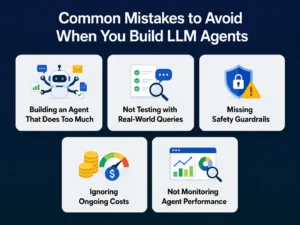
Common Mistakes to Avoid When You Build LLM Agents
Building an LLM agent comes with several challenges. Knowing these early can help you create a more reliable and efficient AI agent.
1. Challenge: Building an Agent That Does Too Much
Many businesses try to build one agent that handles multiple tasks from the beginning. This often leads to poor performance and more errors.
Solution: Start with one specific use case and make it work well. Once the agent performs reliably, you can gradually add more features and capabilities.
2. Challenge: Not Testing with Real-World Queries
Testing only with simple or ideal examples doesn’t show how the agent will perform in real situations. Users often ask unclear, incomplete, or unexpected questions.
Solution: Test your LLM agent with real customer queries and different scenarios. Regular testing helps identify issues early and improves response quality.
3. Challenge: Missing Safety Guardrails
Without proper guardrails, an agent may generate incorrect information or perform actions it shouldn’t. This can lead to security and compliance issues.
Solution: Add clear rules, permission controls, and human approval for sensitive tasks. These safeguards help keep your agent reliable and secure.
4. Challenge: Ignoring Ongoing Costs
Many teams focus only on development costs and overlook expenses like API calls, token usage, cloud hosting, and maintenance. These costs can increase quickly as usage grows.
Solution: Monitor token usage and infrastructure costs from the beginning. Optimizing prompts and workflows helps reduce long-term operating expenses.
5. Challenge: Not Monitoring Agent Performance
Without tracking the agent’s actions and responses, it becomes difficult to understand why mistakes happen or how to improve them. This often slows down future updates.
Solution: Keep logs of conversations, tool usage, and decisions. Regular monitoring makes it easier to identify issues, improve accuracy, and maintain consistent performance.
Why Work With Expert LLM Development Services
Developing LLM agents on your own is possible, but it takes time, testing, and constant learning. Many businesses instead choose to partner with a trusted team that already knows the pitfalls.
This is where professional LLM Development services make a real difference. An experienced partner can help you:
- Choose the right model and framework for your exact use case
- Design a safe, well-tested planning loop
- Control your monthly token and hosting costs from day one
- Connect your agent to your existing tools, CRM, or website
- Launch faster, with fewer costly mistakes
Developer Bazaar Technologies helps businesses design, build, and launch custom AI agents and LLM-powered applications, from a simple support bot to a full multi-agent enterprise system.
If you are ready to move from idea to a working AI agent, the team can guide you through every step, model selection, tool integration, training, testing, and safe deployment.

Final Thoughts
Learning how to develop LLM agent solutions is no longer only for big tech companies. With the right plan, the right tools, and a step-by-step approach, any team can build LLM agents that save time, cut costs, and serve customers better.
Start small. Pick one clear job for your agent, choose a model, add a few tools, test it well, and grow from there. And if you would rather skip the trial and error, expert AI Development services can help you go from idea to a working agent much faster and with far fewer surprises.
FAQs
1. How do I know if my business actually needs an LLM agent instead of a chatbot?
If your solution only answers common questions, a chatbot is usually enough. However, if it needs to plan tasks, use business tools, access company data, or make decisions across multiple steps, an LLM agent is the better choice.
2. How many tools should an LLM agent have in the beginning?
Start with only two or three essential tools that directly support your use case. Adding too many integrations early increases complexity and makes testing and maintenance more difficult.
3. How can I measure whether my LLM agent is successful after launch?
Track metrics such as task completion rate, response accuracy, user satisfaction, average response time, and the number of cases requiring human intervention. These KPIs provide a clearer picture than simply counting conversations.
4. When should I upgrade from a single-agent system to a multi-agent architecture?
Consider a multi-agent setup when your application handles multiple independent workflows, such as customer support, data analysis, scheduling, and reporting. For most businesses, a single agent is sufficient during the initial stages.
5. Can an LLM agent work with my existing business software?
Yes. Modern LLM agents can integrate with CRMs, ERPs, helpdesk platforms, databases, email systems, payment gateways, and other business applications through APIs, allowing them to automate existing workflows.
6. How often should an LLM agent be updated after deployment?
Review your agent regularly based on user feedback, new business requirements, and model updates. Monthly performance reviews and periodic prompts or workflow improvements help maintain high accuracy and reliability over time.